The New Browser Wars

There’s a new browser war heating up, and it’s all about artificial intelligence. Google—assuming they’re allowed to keep Chrome—is quickly turning it into an artificial intelligence-based browser experience. They’re not alone, though.

Firefox is adding experimental AI-powered link previews. Safari already has some basic artificial intelligence features. (And hopefully, we’ll learn that there are many more next week.) The Browser Company is discontinuing the ARC browser in favor of its new, unreleased browser, Dia, which will also rely heavily on artificial intelligence features.

It doesn’t surprise me that artificial intelligence will upend not only traditional search but also traditional browsing. I don’t think anyone is clear yet what that means.

But we can expect a lot of interesting experiments to show up in browsers over the next few years as it shakes out. If you’ve been using the same browser for a long time, this may be the time to get curious about some new competitors. In this case, I’m taking my own medicine, as I’ve been running ARC, until its recent cancellation announcement, and Brave, which is my favorite chromium-based browser. I think I’m going to even have to spend some time with Chrome. Interesting times.

A Voice-Based Future?

I’m still thinking plenty about this collaboration between ChatGPT and Jony Ive. The Frontier Model LLMs are a revolutionary technology, but perhaps there is a new hardware paradigm for using them we haven’t seen yet.

Still, I think it’s going to be hard for people to give up their screens, but clearly that’s exactly what Altman and Ive are looking for. I do believe the paradigm of voice computing is underrated. We’re all so used to our keyboards and screens. It’s hard to imagine a world where your primary interface is your voice.

I’ve always been a fan of dictation, so voice computing makes more sense to me than it does to most people. But we never really had the technology to explore it fully until recently, and yet we still really haven’t gone very far in that experimentation.

Personally, I’ve been trying to work more with the ChatGPT and Gemini voice interfaces just to explore the rough edges of a future that is more based in voice computing, and I’m finding it more useful than I thought it would be, even at this early stage.

One of the best uses is as a thought partner, where I can talk about something I’m thinking about, writing about, or working on, and ask for constructive criticism of the idea. The voice interface will point out flaws in logic and thought in a way that is way more fluid than it would be with a keyboard and screen.

Granted there are still vast swaths of my computing that wouldn’t make sense with this paradigm, but what if it could evolve? Several years ago, there was a movie called Her, where the protagonist fell in love with his AI operating system, which seemed silly at the time, but now not so much so.

What’s interesting, however, was the hardware he used was just a little earbud. That was his computer. It talked to just him, and he talked back to it, and it handled the administrative details of his life. I could easily see such a computing interface becoming common in the not-so-distant future.

Whisper Memos Now Summarizes

One of the easiest ways to take advantage of artificial intelligence right now is voice-to-text transcription. I’ve been dictating to computers for decades, and I can tell you it’s never been easier than it is now. My weapon of choice for this on my iPhone is Whisper Memos. (The app has in the past sponsored MacSparky, but I was a paying subscriber long before that.)

The developer recently informed me that he was working full-time on his various Whisper-related applications and this change is already paying dividends. A recent update to Whisper Memos adds an auto-summarization feature. So now, in addition to reliably catching your words, you can also get a summary of anything you dictate to the application.

Below is a video that I created for the MacSparky Labs over a year ago, showing how I’ve combined this application with the action button on my Apple Watch to give me a seamless dictation workflow. I’m still using it daily.

Also, want to join the MacSparky Labs? The discount code: HOORAYWHISPER gets you 10% off, but it’s only good until Sunday.

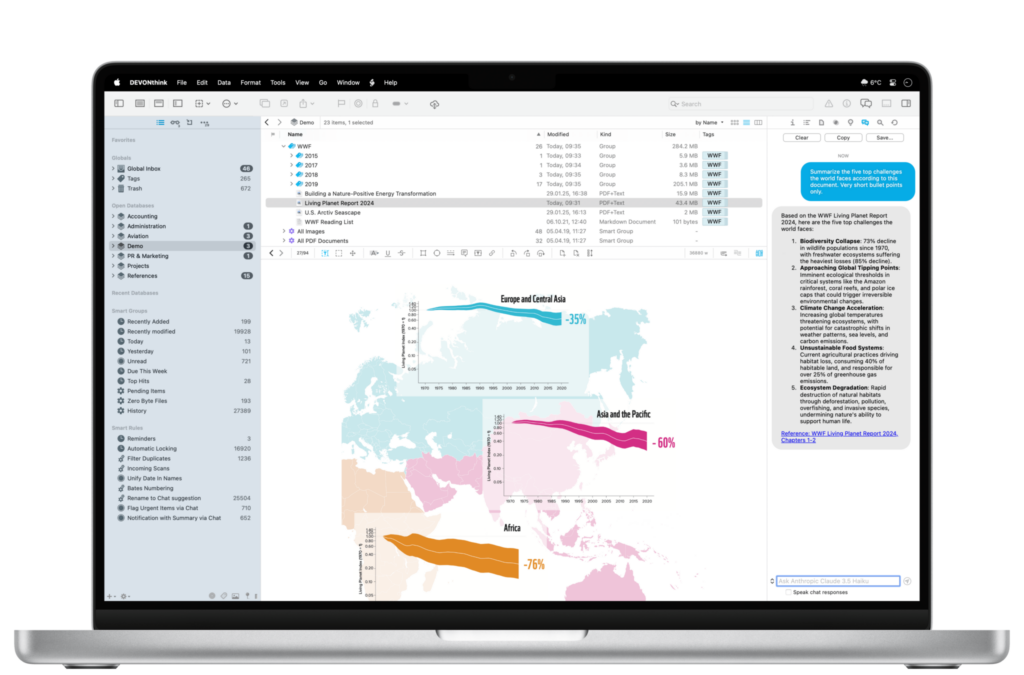
DEVONthink 4 Beta: AI That Makes Sense for Power Users (Sponsor)

With WWDC finally here and everyone talking about AI, I’ve been thinking about which AI tools actually earn their place in my workflow. Most feel like solutions looking for problems–but DEVONthink 4 is different.

I’ve been testing the beta, and what strikes me most is how thoughtfully they’ve integrated AI into what’s already the gold standard for document management. This isn’t AI for AI’s sake. It’s AI that solves real problems for folks who work with lots of information.

The Chat Assistant lets you have conversations with your documents, which sounds gimmicky until you try it with a research project. Ask it to summarize themes across dozens of PDFs, or find connections between notes from different projects. It’s like having a research assistant who’s read everything in your database.

But the real power is in the automation. Smart rules can now use AI commands to auto-tag, label, and rate documents as they come in. Imagine never having to manually organize research papers or client files again. The AI summarizing feature is particularly clever. It creates concise summaries that actually capture what matters.

What I appreciate most is DEVONthink’s approach to AI providers. Instead of locking you into one service, they support multiple providers and models, including local ones if privacy is a concern. They’re even planning Apple Intelligence support when it arrives.

For those of us who’ve built our workflows around DEVONthink’s powerful search and organization features, version 4 feels like a natural evolution rather than a gimmicky add-on. The AI genuinely makes the app more useful without getting in the way.

The beta is available now, and if you’re curious about AI that actually serves your productivity instead of just impressing at parties, it’s worth a look.

Some Notable Fantastical Updates: AI Event Creation and Multiple Windows

Fantastical’s initial selling point was the frictionless creation of new events. Although they’ve added many new features since then, Fantastical hasn’t lost touch with its roots.

You can now forward an email containing an event to Fantastical (email@fantastical.app) from your Flexibits account email and Fantastical’s AI will, on the back end, parse the email and add the event to your calendar. Clever.

Calendar management is one area ripe for AI assistance, and I hope this is just the beginning for Fantastical.

Another Fantastical update that has been a game changer for me is adding multiple window support for your Mac. So now I can leave my big monthly calendar as a full-screen app, while still having a movable/resizable calendar with my favorite calendar app.

The Original Workflow Team is Back with Sky

Two years ago, the original Workflow team left Apple to announce they were working on a secret project to use AI to control your Mac. Today, they revealed that product: Sky, an AI assistant you can invoke anywhere on your Mac to pull off some genuinely impressive tricks.

For those who might not remember, Ari Weinstein and Conrad Kramer were the original team behind Workflow, the automation app that Apple loved so much they acquired it and turned it into Shortcuts. If you’ve ever used Shortcuts on your iPhone, iPad, or Mac, you have these two to thank. Now they’re back with their co-founder Kim Beverett, and anything this team creates immediately has my attention.

The app isn’t available yet, but you can sign up for notifications about its release. According to their website, Sky is launching this summer, and I strongly recommend getting on that waitlist.

Sky is a Mac automation tool that integrates with any application (AppKit, SwiftUI, or Electron) and allows users to control their computer through natural language commands. Its standout feature “Skyshots” captures both visual content and underlying data when you hold both Command keys, enabling you to reference screen content with phrases like “this” or “here.” The tool excels at natural language processing for tasks like organizing files or creating calendar events from displayed data, while offering built-in integrations for Calendar, Messages, Notes, web browsing, and other core Mac functions. For advanced users, Sky supports custom tool creation through Shortcuts, AppleScript, and shell scripts.

People are already taking swings at putting an AI layer on your Mac, but I’ve yet to find an implementation that feels natural. Sky looks like it may be the one that figures that out.

The ability to just ask your Mac to do complex tasks – and have it actually work across any app – is the kind of thing we’ve been promised for years but never quite delivered. If Sky can execute on this vision (and given this team’s track record, I’m optimistic), it could fundamentally change how we interact with our Macs.

Federico Viticci’s detailed preview at MacStories goes much deeper into Sky’s capabilities and technical implementation if you want the full story. But honestly, this is one where I can easily recommend you go sign up for the waitlist. When the team that created Workflow and Shortcuts builds something new, it’s worth paying attention.

The future of Mac automation might just be as simple as asking for what you want.

While Google Leaps, Apple Lingers

I watched the Google I/O event this morning. It’s shocking just how much Google has bet the company on AI. They’re even replacing search! In contrast, one of Apple’s tent poles will be a user-interface revamp. I can’t help but think Apple’s still fighting the last war while Google is gearing up for the next one. From the outside, it appears Apple is asleep.

Clearly, Apple has opted out of the frontier model race, and I can see why they did that. It feels far enough out of their wheelhouse that perhaps they should have passed on it. (Although what would have happened if they took the investment in the failed car and put that into AI back in the day?)

Where I’m baffled is Apple’s lack of embrace of AI technologies in their most important product, the iPhone. Thus far, the Apple Intelligence features seem like crude experiments compared to what Google, OpenAI, Perplexity, and everyone else is doing. It’s time for Apple to put down some big bets on AI for its platforms. I’ll be watching WWDC closely.

Apple and AI: Time for Action, Not Excuses

Mark Gurman has published the latest tell-all about Apple’s failure to claim a seat at the artificial intelligence big boy table. The more I read about this, the more it becomes clear that failure here has many fathers. Some of Apple’s leadership apparently didn’t see the underlying technology as relevant. Some didn’t want to spend the money. Others just didn’t make it a priority. For all of these reasons, there’s a ton of innovation happening right now in artificial intelligence, and Apple is responsible for none of it.

At this point, I’m much less interested in how Apple got into this position and much more interested in how they intend to get out of it. Apple remains a massive company with tremendous resources, and in my opinion, it’s not too late to turn this battleship around. I still think Apple’s idea for artificial intelligence, as expressed last year at WWDC, makes sense: refine AI into genuinely useful tools that consumers want, and combine that with private, on-device data to give users something truly unique.

But the question that I first asked last June still remains unanswered: Does Apple have the AI chops to actually make this happen? So far, it appears they don’t. There’s been a recent management shuffle, with Mike Rockwell now in charge of Siri, but the jury’s still out on whether this will be enough.

I’m hoping that the combination of leadership changes and a very public black eye will finally give Apple the push it needs to deliver something remarkable in AI. At the end of the day, Apple’s users—myself included—are waiting to see if the company can make good on its promise to deliver thoughtful, private, and genuinely helpful artificial intelligence.