Solving for Meaningfulness

In productivity, we worship efficiency. The fastest way to clear an inbox. The most automated way to track a project. The most frictionless method to organize our lives.

I’m going to suggest something different.

When it comes to your goals and plans, efficiency is the enemy.

I learned this the hard way last year. Trying to be hyper-efficient, I dictated my quarterly review and used AI to organize the text into a structured plan. The resulting document was thorough and efficiently produced.

It failed completely.

A picture of David's hand written Q1 Plan
My Q1 plan was hand written for a reason.

By skipping the struggle of manually organizing my thoughts, I hadn’t actually internalized the goals. The plan remained a digital file rather than a core part of my squishy human brain. The process of birthing the ideas is what makes them sink into your core.

I learned, again, that you cannot optimize the pursuit of virtue and your character.

Much of the tech industry has monetized us as advertising units, designing tools that prioritize engagement and speed over our personal flourishing. Choosing to go intentionally slow is an act of rebellion. It’s the refusal to live your life randomly.

The world will try to bury you with petty nonsense. Everyone has good intentions when they ask for just one more little thing. But every “yes” to the unimportant is a “no” to what actually matters.

Solving for meaningfulness means giving yourself permission to ignore the siren song of doing more. It means taking an hour in the morning to read and reflect, or taking two days for a personal retreat, even when your inbox is screaming.

These aren’t inefficient uses of time. They’re the highest and best use of your life because they ensure you’re actually heading toward a destination that matters.

As we enter a new year, resist the temptation to optimize everything.

Some things deserve to be slow. That’s where the meaning lives.

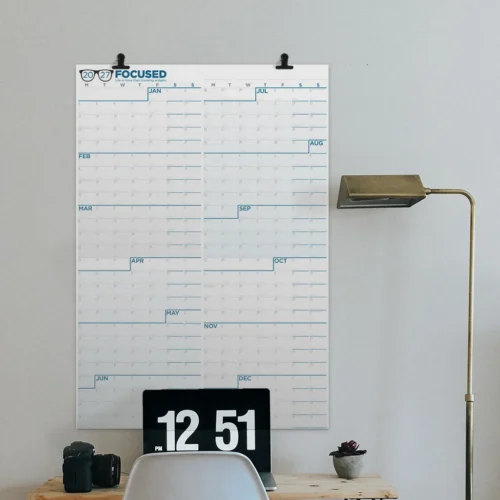
The 2026 Focused Calendar

It’s not too late to get the Focused Wall Calendar for 2026. Mike and I have been collaborating with the NeuYear folks for years, and this is, in my opinion, the best wall calendar on the market.

We’ve spent a lot of time tweaking this calendar over the years to get it just right. Here are some of the features I love:

  • It starts on Monday, as a proper calendar should.
  • It’s big at 25 inches by 36 inches. This isn’t one of those calendars you have to squint at.
  • The year-at-a-glance view is invaluable. Over the years, this calendar on my wall has gotten me out of a lot of pickles as I look at the calendar to see just how busy I am before I say yes to another commitment. There’s something about seeing three weeks of wall-to-wall appointments that makes saying no much easier.
  • It’s designed with no gaps between the months. The philosophy is simple: we think in weeks, not months. This calendar presents 52 weeks as a continuous flow, which makes it easy to see the distance between any two dates and plan across months without artificial boundaries.
  • You can write on it with dry-erase or wet-erase markers. I’ve tried both, and they both work great. The dry-erase is better if you’re constantly adjusting things, while wet-erase stays put better for long-term commitments.
  • It’s two calendars in one. Flip it over and you get a different orientation. One side is portrait, the other landscape. I keep mine in landscape above my desk, but you can hang it vertically on a door if that works better for your space.
  • The quarterly shading is genius. The calendar breaks the year into four quarters with background shading, making it easy to set quarterly goals and see reset points throughout the year. Buffer weeks are built in so you can review what worked, celebrate wins, and adjust course if needed.
  • The habit tracking system at the bottom lets you create your own color-coded system. Each day has space to track up to four habits, and it shows you how many days are left in the quarter to keep you honest.

It’s beautiful. This matters more than you might think. When your productivity tool looks good, you actually want to use it. Attraction breeds commitment.

You can buy it now. Mine is already on order.

PowerPhotos 3.0: The Power Tools Apple Photos Needs (Sponsor)

I’m pleased to welcome back PowerPhotos as a MacSparky sponsor. If you’ve used Apple Photos for any length of time, you know the app is missing serious power-user tools. PowerPhotos fills those gaps beautifully.

The app has long been the go-to utility for managing Apple Photos libraries. Need to merge multiple libraries into one while keeping your albums, edits, and metadata intact? PowerPhotos does that. Want to split an oversized library into smaller, more manageable ones? Done. Looking to hunt down and eliminate duplicate photos clogging up your drive and iCloud storage? PowerPhotos has a powerful duplicate finder that handles it.

What’s New in Version 3.0

The newly-released PowerPhotos 3.0 is a significant update with some useful new features:

  • Batch metadata editing — Edit photo titles, captions, and keywords directly in PowerPhotos, with keyboard-focused editing that makes tagging and organizing photos fast
  • Advanced search engine — A new indexing system with nested predicates lets you search by criteria Photos doesn’t support, like file size, dimensions, and video duration. You can save your smart searches too.
  • Enhanced photo browser — The browser is now faster with live updating as your library changes, plus new export options including XMP support and whole library export

PowerPhotos 3.0 is a paid upgrade. If you’re an existing user of PowerPhotos 2 or earlier (or even the old iPhoto Library Manager from way back), you can enter your old license key for 50% off. Everyone can use the coupon code MACSPARKY26 for 20% off both regular and upgrade orders.

If you want to go deeper, Brian Webster (the developer behind PowerPhotos) joined Stephen and me on Mac Power Users episode #810 to talk about the app and its features.

Check out PowerPhotos today.

December in the MacSparky Labs

December was a busy month in the MacSparky Labs!

There were four weekly Lab Reports to keep members up-to-date with Apple news, a Deep Dive on Year End Tech Stack Audits, a Book Club meeting on Apple in China, a Jam Session on Career Transitions and Retirement, and videos on topics like Apple Music and ChatGPT. And much more.

Here’s what took place in the Labs for the month of December 2025:

  • 2025-12-29 – MacSparky’s Life Update 2025 (Video) (M,I,P)
  • 2025-12-26 – The Lab Report for December 26, 2025 (M,I,P)
  • 2025-12-24 – Apple Music and ChatGPT (M,I,P)
  • 2025-12-23 – Using MCP with Third-Party Software on the Mac (I,P)
  • 2025-12-19 – Deep Dive – Year End Tech Stack Audits (Labs Podcast) (P)
  • 2025-12-19 – Email Linking Script Update (and Keyboard Maestro Script Execution) (M,I,P)
  • 2025-12-19 – Lab Report 2025-12-19 (M,I,P)
  • 2025-12-17 – Getting Links to Apple Notes Using Keyboard Maestro (I,P)
  • 2025-12-14 – Book Club 005 – Apple in China (Podcast) (M,I,P)
  • 2025-12-13 – Jam Session 005 – Career Transitions and Retirement (Podcast) (I,P)
  • 2025-12-12 – Deep Dive – Year End Tech Stack Audits (Event) (P)
  • 2025-12-12 – The Lab Report for December 12, 2025 (M,I,P)
  • 2025-12-12 – Book Club 005 – Apple in China (media release) (M,I,P)
  • 2025-12-11 – Jam Session 005 – Career Transitions and Retirement (Podcast) (I,P)
  • 2025-12-10 – Labs Momentum Club (I,P)
  • 2025-12-10 – Using PCC for Adding Tasks to Reminders (M,I,P)
  • 2025-12-10 – December Labs Meetup (Media Release) (I,P)
  • 2025-12-05 – Book Club: Apple in China (webinar) (M,I,P)
  • 2025-12-05 – The Lab Report for December 5, 2025 (M,I,P)
  • 2025-12-04 – Dictation Series 02 – Wispr Flow (Video) (M,I,P)
  • 2025-12-04 – Jam Session 005 – Career Transitions and Retirement (Event) (I,P)
  • 2025-12-03 – Labs Meetup (Event) (I,P)

If you’d like to be a part of the MacSparky Labs, you can get more information and join right here.

Mac Power Users 829: Tech That Worked in 2025

With the year winding down, Stephen and I reflect on what went well in our tech stacks, touching on Apple silicon, the company’s default apps, AI tools, home automation, and networking on this episode of Mac Power Users.

This episode of Mac Power Users is sponsored by:

  • 1Password: Never forget a password again.
  • DEVONthink: Get Organized — Unleash Your Creativity. Get 10% off.
  • Ecamm: Powerful live streaming platform for Mac.

WinterFest 2025: Artisanal Intelligence for the New Year (Sponsor)

The new year is almost here, bringing fresh projects, ambitious goals, and creative work that matters to you. Whether you’re outlining your next novel, organizing years of research, planning a product launch, or capturing ideas before they slip away, the right tools make all the difference.

That’s why I’m excited to have WinterFest 2025 as this week’s sponsor.

This year’s theme is artisanal intelligence—carefully crafted tools that help you think better and create more effectively. In a world where “AI” has become  shorthand for automation and hands-off convenience, WinterFest celebrates a different kind of intelligence: software built by small teams who deeply understand their craft and their customers.

These aren’t apps churned out by algorithm or designed by committee. They’re tools honed over years by developers who use them themselves and answer your support emails personally. There are no subscription traps and no bloated feature lists. It’s just great software at a terrific discount for a limited time.

Here’s this year’s roster. I use a shocking number of them:

Many of these apps have been featured on MacSparky and Mac Power Users over the years.

A few personal favorites: DEVONthink remains my everything bucket for documents and research. Cotypist is a new addition to my toolset but already feels like it should be build into macOS. And BBEdit is simply THE power tool for text.

If you’re a writer, Scrivener is the gold standard for long-form projects, and Scapple from the same team is great for capturing and connecting ideas visually.

Head over to the WinterFest website to see the full lineup and grab what you need at 25% off before the sale ends.