On this episode of Focused, I reflect on a year of teaching the Productivity Field Guide, talk about what’s new and what’s changed, and Mike shares the details of his interesting twist to time-blocking.
This episode of Focused is sponsored by:

On this episode of Focused, I reflect on a year of teaching the Productivity Field Guide, talk about what’s new and what’s changed, and Mike shares the details of his interesting twist to time-blocking.
This episode of Focused is sponsored by:

It is worth noting that in January 2025, 13 years after it was first released, Siri continues to be a joke. Every time I try to use Siri in front of a member of my family, there’s a 50–50 chance of success. When it fails, they laugh at it, and at me.
Recently, I was going to bed and told Siri to turn off the bedroom lights. Instead, it turned out all the lights downstairs on the rest of my family. (For bonus points, the bedroom lights stayed on.)
Paul Kafasis and John Gruber most recently documented Siri’s failings. I can’t help but feel we are at a crossroads. Apple made many promises in June about Siri improving with the arrival of Apple Intelligence, and we haven’t seen it in the public betas yet. I hope we get a peek with the next beta cycle, iOS 18.4.
I am not encouraged by the rumor that there is yet another Siri brain transplant rumored to happen in the future. I find it hard to believe that Apple lacks the competency to substantially improve Siri, which makes me wonder when they’ll get the resolve to do so. I sure hope it’s this year.
It’s easy to quarterback from the outside, but if I were in charge, I’d start a “boil the ocean” project to fix Siri and I’d seriously consider rebranding it to something else so that normal folks (like my family) don’t immediately associate it with a joke.

Late last week OpenAI introduced Operator, an AI agent that can go to the web and perform tasks for you. This essentially gives ChatGPT its own browser so it can look up webpages, scroll, type into them, and otherwise interact with the web on your behalf. It’s currently a research preview and limited to people with a ChatGPT Pro account, currently costing $200 per month.
Now that the gauntlet has been thrown down, I expect that we will see “The March of the Agents” from OpenAI, Google, and Anthropic, rolling out over the course of this year. I fully expect by the end of 2025 to be able to have an AI agent successfully order a pizza for me without any interaction from me aside from the instruction. And I expect this will be possible without a $200 a month account(!).
Up until now, our interactions with LLMs have been through an app or a web window where we direct a text conversation. Agents will change that, and it’s coming soon.
I have updated the Productivity Field Guide for 2025. On this episode of Mac Power Users, Stephen and I discuss what’s new in the course, what changes I have made to my various production workflows, and more.
This episode of Mac Power Users is sponsored by:
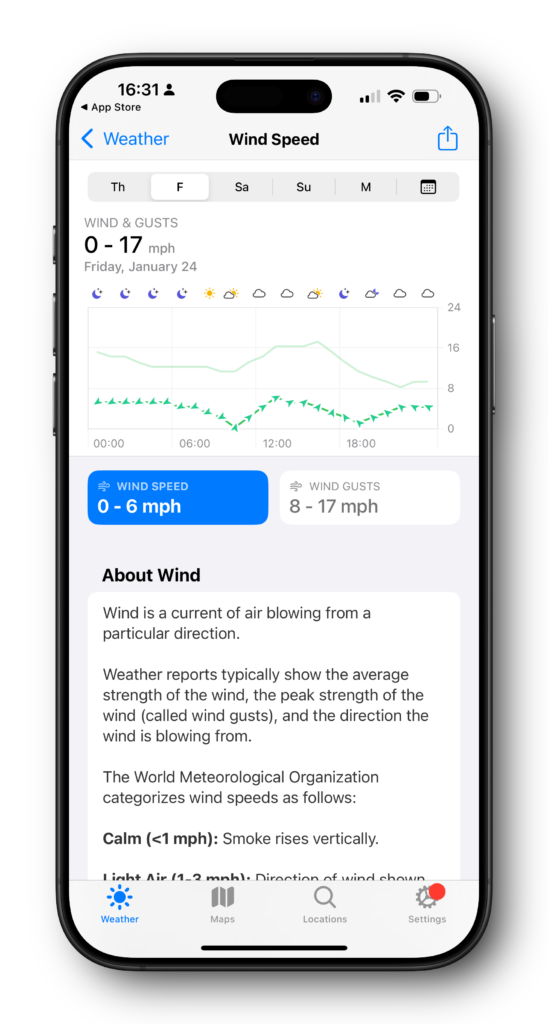
The wind has been on everyone’s mind in Southern California for the last few weeks. In addition to the tragic fires up in Los Angeles, down here in Orange County, everything is equally dry, and the wind is blowing equally fast. Last week, one night, we clocked it at 79 miles an hour in my backyard.
Somewhere along the way, I let my CARROT Weather subscription lapse. The Apple weather app has come a long way, and it’s just fine for general information like the temperature and forecast. But getting predictable wind information out of it is a pain in the neck. So much so that I re-upped with CARROT weather and, within seconds, had precisely the data I was looking for. While the Weather app is good enough for many people, CARROT Weather remains the king.
The iPhone is now 18 years old, and it’s easy to forget life before it. I used mobile phones before iPhone, and the difference was night and day.
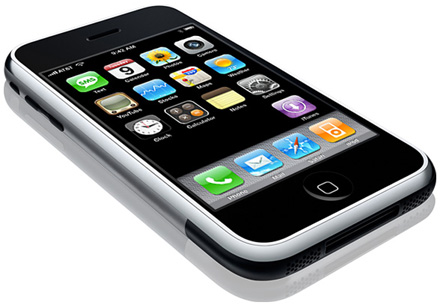
Over the years, we’ve heard a lot about how competitors put their heads in the sand when the iPhone was first announced. My favorite is the story about Blackberry not believing it was true, that Jobs had somehow faked everybody out with non-existent technology.
However, in a recent data release by Nokia, it’s clear that they took it seriously. Nokia immediately started shifting direction with its products in development, recognizing the value of the multi-touch user interface. People now say that the iPhone innovation was inevitable and that if Apple hadn’t done it, somebody else would have devised a smart phone with a flat slate of glass. But looking at contemporaneous documents, it sure doesn’t seem like it. (via John Gruber’s Daring Fireball.)
One police department in Colorado is now sending out a free AirTag with your automobile registration. The kicker is it has a sticker that you can put in your window explaining that police can track the vehicle.
I’m curious as to whether or not this will result in a decrease in stolen cars. I used an AirTag on my bicycle but had never thought about leaving one in the car. Obviously, people are doing this. There’s even an active market on Amazon for warning stickers.

The current rumor via Mark Gurman is that Apple Mail will get the expected redesign and update with macOS 15.4 beta and the upcoming iPad 18.4 beta. I sure hope so.
While I’ve found the rudimentary email filtering they added on the iPhone useful for mail triage, I don’t think it can be judged until it’s on the Mac, at least for me. Apple Mail has long been overdue for an update and it’s nice to see some progress made.
While you’re at it, Apple, two requests:
That is all. For now.
Our iPhones are always with us, making the Home screen very valuable real estate in our lives. On this episode of Mac Power Users, Stephen and I share our Home screens and Focus modes and how our devices help keep us on track.
This episode of Mac Power Users is sponsored by:
In a few weeks, I’ll release the new 2025 edition of the Productivity Field Guide, where I blend ancient wisdom for life’s big questions with modern techniques for tactical execution. One key topic we explore is block scheduling, and something important I’ve learned from my students is that traditional block scheduling isn’t for everyone.
That’s perfectly fine. What I’ve discovered is that there’s a gentler approach that can work for almost anyone. Instead of overhauling your entire calendar, start with just one nagging task. You know, the substantial one that keeps slipping off your to-do list.
The approach is simple: Open your calendar app of choice and find a significant block of free time, perhaps next Tuesday afternoon. Make an appointment with yourself – not a quick 30-minute slot, but a substantial three or four hours where you can dive deep and make real progress. Label it clearly, and if you share calendars, mark yourself as unavailable. This time is sacred.
This simple practice works magic in two ways. First, you’ve transformed that vague, anxiety-inducing task into a concrete commitment with a specific time and date. You can release it from your mental burden until then. Second, you’ve carved out and protected that time; it’s now as important as any client meeting or medical appointment.
The key is showing up for yourself. When that scheduled time arrives, honor it as you would any other commitment. If something truly urgent arises, don’t just let the appointment vanish, reschedule it. The work either gets done in its allocated time or finds a new home on your calendar, but it never simply disappears.
I’ve shared this gentle approach with many people who were initially resistant to full-on block scheduling, and they’ve found it remarkably helpful. It works especially well for those daunting tasks that feel overwhelming. Something about placing them on the calendar diminishes their power. You’re no longer avoiding them; you’ve created a concrete plan to tackle them.
Remember, this isn’t about becoming a productivity machine. It’s about creating space for what truly matters. Sometimes, this minimal approach to scheduling is all you need to move forward.
As for the upcoming Productivity Field Guide, I’m excited to offer two versions: one including the videos, book, and course materials, and another that adds a 12-week webinar series. I’ll have a lot more news on this soon. I can’t wait to share these resources with you and hear your thoughts.