
It has been a crazy few days at MacSparky. I’ve been unhappy with my prior domain server for some time. There has been a constant poblem with network speed. The kicker, however, was downtime. I have experienced recurring downtimes culminating in a…
Continue reading →Post Category → Uncategorized
Posterous at MacSparky
On my recent trip to Yosemite I had very limited access to bandwidth. It made me think a lot about using Posterous so here I am trying it out. You can find me at sparks.posterous.com.
Posted via email from David’s posterous
Continue readingMac Power Users 8: Backup!

Mac Power Users, episode 8, published over the weekend. This one is all about backup. Get it before it’s too late.
Continue readingSimple Hack – Label Your Stuff
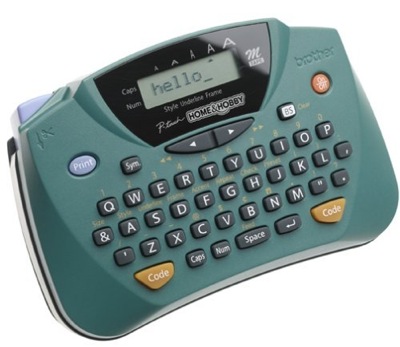
I have always put labels on my tech stuff. A simple label with my name and cell phone number adorns most of my traveling gear like my Mac, its power supply, a portable hard drive, and even my iPhone (of course using a different contact number). This would allow any person to easily contact me if my Mac ended up in their hands. I realize that if my stuff were to fall in the hands of someone dishonest, this really won’t do much good but I’m an optimist and think most people would return lost equipment. It certainly can’t hurt.
Insuring Your Mac

I mentioned in my hackintosh article that I keep a theft/damage insurance policy on my laptop. I also discussed it on this week’s Mac Roundtable. I have received several e-mails from readers asking where I got it. I’ve used Safeware.com for several years. The policy costs $108 per year and insures my MacBook Air up to $1,800. Since I bring my laptop everywhere, it makes sense to me. Thankfully, I’ve never needed to make a claim. I can offer no opinion about their claims process but Safeware.com is the company I use.
Also, I use this policy in addition to AppleCare. As I understand it, AppleCare covers any mechanical, internal problems and the Safeware policy covers theft and accidents.
Path Finder on Sale

If you are looking to turn up the geek meter, my favorite file management application, Path Finder (reviewed here) is 35% off through tomorrow at MacZot.
Continue readingMerry Christmas!

Merry Christmas to all! I will be spending the next day with my family and “unplugging” a bit. May Santa stop by Cupertino on the way to your Christmas tree. If you have little ones, you may want to track Santa yourself right here.
Continue readingHyperspaces Review
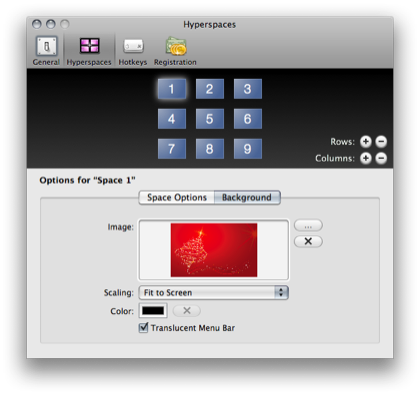
The Spaces feature in OS X Leopard is one of those things you either love or hate. Since I do a lot of my computing with a 13″ laptop screen, I find it very useful. The trouble is quite often I’m clueless as to which space I am actually occupying. I know I can display the number in the menubar but that just gets me more befuddled.
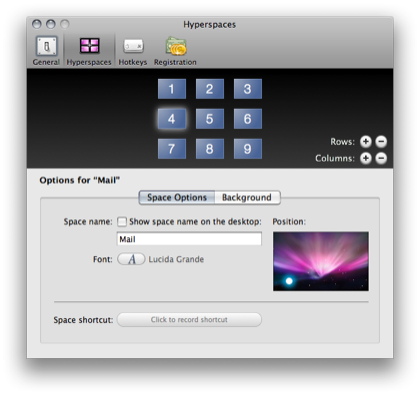
Hyperspaces is a small application designed around this specific problem. It allows you to set a custom wallpaper for each space. It also allows you to give each space its own specific name. So, instead of seeing “Space 3” in my menubar, I see “Writing”, I also have spaces for OmniFocus, iCal, Mail, and a few others. You can display the label up in your menubar or even right on top of the current desktop. The application offers several ways to navigate including custom hot keys to switch directly to a certain space or add and remove spaces.
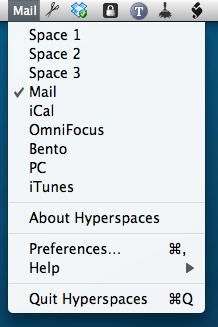
Be warned that if you are running an older machine or one without a dedicated video card. Loading up multiple wallpapers could eat into clock cycles. Fortunately the developer also allows you to configure it so it just changes color or, if you really like one specific wallpaper, you can rely on Hyperspaces other notification methods such as the menubar and on top of the desktop.
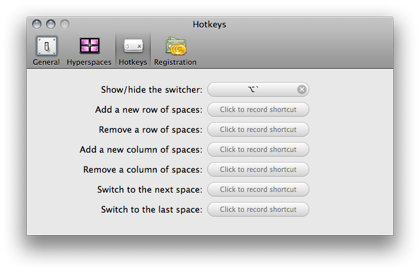
One feature this application begs for is a customizable dock. I know this is a 1.0 release, but if the developer could allow you to additionally customize your dock for each space with this single application, he will please a lot of unsatisfied Spaces users.
With the demonstration version you can customize three of your spaces. If you want more than that, you can buy a license for $13. The developer gives out his email on the application website and encourages feedback. It appears to be a well loved project with a bright future. While Hyperspaces is still a bit rough on the edges (this review is of final candidate 1.0), I see this application getting traction with Spaces power users soon. You can find it at Hyperspacesapp.com.
This review was also recorded and published on the MacReviewCast episode 122.
Mac Roundtable Episode 51

Over the weekend, I was fortunate to participate in recording the 51st episode of the Mac Roundtable. As always, it was a lot of fun talking with fellow Mac geeks. We covered the new MacBooks, MacBook Pros and Allison’s tale of woe when she wiped out her brand new MacBook Pro with a magnet. In the picks I covered PGP Whole Disk encryption which will get more attention here at MacSparky in the not too distant future.
Continue readingSelling the MacBook Pro
Funny how these ideas develop. It has been bugging me that since I got the MacBook Air, I never seem to take my MacBook Pro off my desk. I’ve slowly come to the realization that an iMac would be much better suited to the way I am using the MacBook Pro. As a result, I’m toying with the idea of selling my MacBook Pro. It has the following specs:
* 17″ MacBook Pro (circa April 2008)
* 2.6 ghz
* 4 gig Ram
* 320 Gig HD
* AppleCare through April 2011
* I’ll also include a Rain Stand, case, and extra power supply.
This is the current MacBook Pro but I’m sure it will be replaced with the new model shortly. If any readers are interested, I’m selling it for $2,200 plus shipping. I’m not sure if I am being silly switching to an iMac but I’m going to put it up and let fate decide.
********* Update ********
I actually had a guy call me and offer my asking price but in the end I got cold feet. When the MacBook Pro needs to be replaced in a few years, I’ll probably do so with a desktop machine but for now I’m going to stick with it. Thanks everyone for the ideas and notes.