
Here’s a walkthrough of how I’m using my Stream Deck with OmniFocus. I also share some interesting OmniFocus Automation tools… This is a post for MacSparky Labs Level 3 (Early Access) and Level 2 (Backstage) Members only. Care to join? Or perhaps do you need to sign in?
Posts Tagged → omnifocus
OmniFocus Deep Dive (MacSparky Labs)
Here’s the deep dive session on how I’m using OmniFocus these days…
This is a post for MacSparky Labs Level 3 (Early Access) Members only. Care to join? Or perhaps do you need to sign in?
OmniFocus Deep Dive (MacSpark Labs)
I’ve been rethinking many of the ways I use OmniFocus. I’ve reduced the number of projects and rebuilt many of my perspectives. It’s time to share them with you…
This is a post for MacSparky Labs Level 3 (Early Access) Members only. Care to join? Or perhaps do you need to sign in?
Shortcuts-Based Project Setup Automation (MacSparky Labs)
Here’s my latest project setup shortcut incorporating Craft, OmniFocus, and the calendar for project automation…
This is a post for MacSparky Labs Level 3 (Early Access) and Level 2 (Backstage) Members only. Care to join? Or perhaps do you need to sign in?
The Omni Group Roadmap and A Few Thoughts on OmniFocus
The Omni Group has published its latest road map. As a fan of their software, I love reading these. They are committing to release OmniFocus 4 this year and they are also working on an update to OmniGraffle. I’ve heard from a lot of folks about the OmniFocus 4 release, and I’ve got a few thoughts:
- Many readers tried the early betas and didn’t care for it. If that’s you, I’d encourage you to give the current, later betas, another look. A year ago, they were focused on features. They’ve done a ton of UI polish since then.
- The Omni Group is the first company I’ve seen emerge from the morass of Swift UI with a high-end productivity app. I expect this will pay dividends going forward. Just like we’re now seeing Apple release major new features across all platforms at once, I expect we’ll see the same from the Omni Group.
I went into the wild over the last six months looking seriously at other task manager options including Reminders, Things, and some of the emerging online tools. I started that survey willing to move to another app, but ended up right back where I started. My takeaway is that OmniFocus is still the only option for me. (Perspectives are so powerful and you can link anything, anywhere.) While Reminders is a lot better, on a scale of 1 to 10 it goes to 7, whereas OmniFocus goes to 11.
Finally, now that I’ve finished my survey, I’ve committed three months to making an entirely new edition of the OmniFocus Field Guide once the new version ships.
OmniFocus Checklists (MacSparky Labs)
I’ve been using a new technique in OmniFocus with checklist-based perspectives, and it greatly simplifies the chaos. Here’s how I do it…
This is a post for MacSparky Labs Level 3 (Early Access) and Level 2 (Backstage) Members only. Care to join? Or perhaps do you need to sign in?
Automating OmniFocus Tabs (MacSparky Labs)
OmniFocus’s ability to split perspectives among tabs is one of its most useful features. So why not automate it with me? …
This is a post for MacSparky Labs Tier 2 (Backstage) and Tier 3 (Early Access) Members only. Care to join? Or perhaps do you need to sign in?
OmniFocus 4 for Mac Tour (MacSparky Labs)
Omnifocus 4 for Mac is now in public beta. Here’s a video walking through the new user interface and features…
This is a post for MacSparky Labs Tier 2 (Backstage) and Tier 3 (Early Access) Members only. Care to join? Or perhaps do you need to sign in?
Sal Soghoian and OmniFocus Voice Commands Video Interview
A few months ago, I did an extended Friends of Dave interview with Sal Soghoian about the new voice commands for OmniFocus. This has been in the MacSparky Labs for a few months, and several members have been using this cool feature. This is one of those things I wanted to make sure everyone can see, so here it is.
I put a lot of content like this in the MacSparky Labs. I’d love to have you join.
Links from Video
OmniFocus 4 Beta for Mac
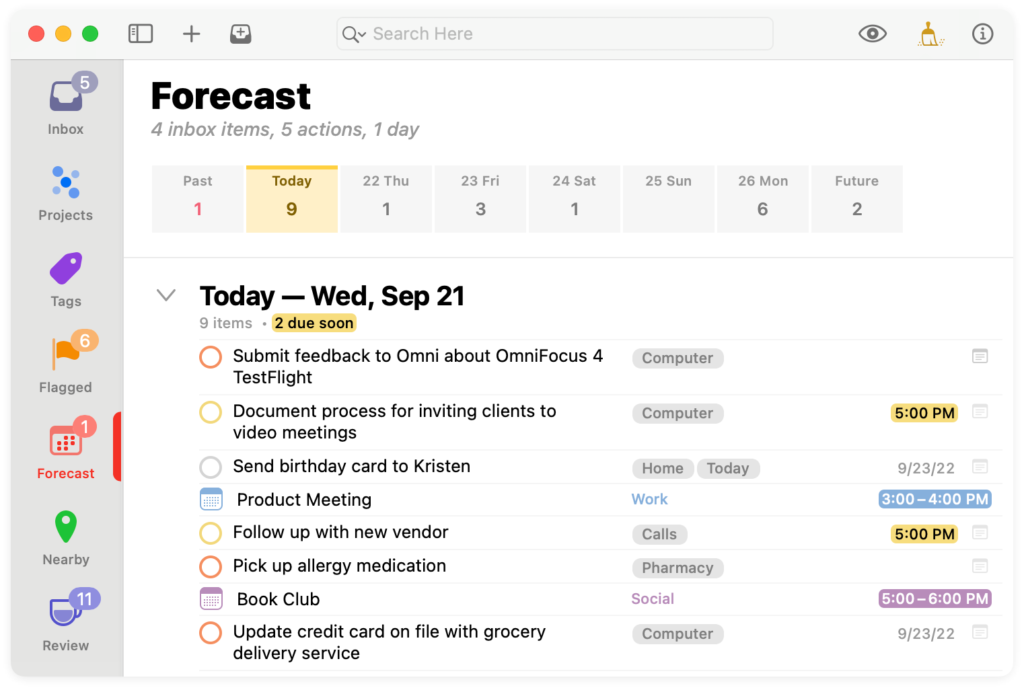
The OmniFocus team has been hard at work on OmniFocus 4 for some time now. Recently they announced the public release of the Beta for OmniFocus 4 for Mac. There are several significant improvements coming with OmniFocus 4:
Feature Parity
With OmniFocus now built around SwiftUI, Mac, iPhone, and iPad features are essentially in sync. Generally, you get all features everywhere. For example, you can now get location-based tags on the Mac for the first time.
New Design
The new design is lighter than previous iterations of OmniFocus. There’s more white space, and the UI is much cleaner. Nevertheless, it still feels like a flavor of OmniFocus.