
Author Steven Poole wrote a really nice piece about removing Microsoft Word from his hard drive that echoes many of my sentiments from my Pages review. Of note, he also mentions Scrivener which I am also a big fan of, but haven’t mentioned here because I intend to review it in the not so distant future.
Continue readingVista Compatible iMac
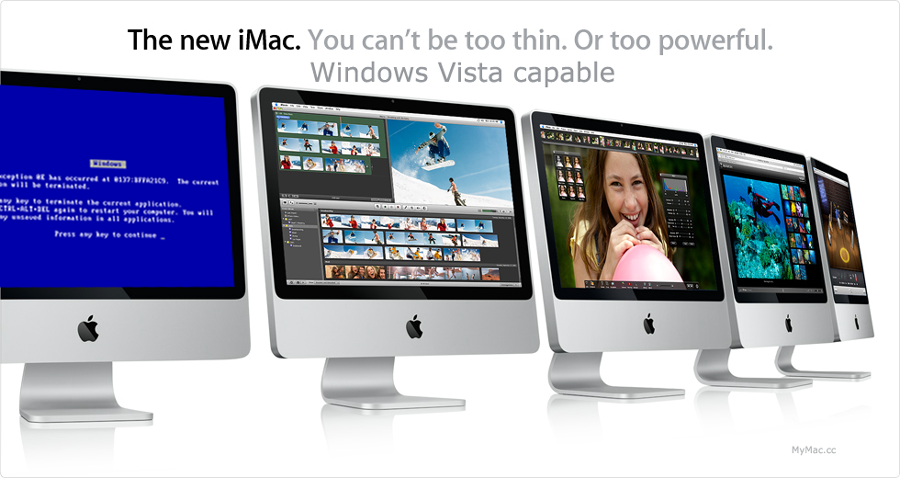
This was just too funny not too post.
Screencast 6 – MagiCal


There has been a brief hiatus in screencasts as a result of me having so much fun with the new iWork suite, vacation, and a lot of personal and professional commitments. Nevertheless, here is #6 in which I walk you through installation and set up of an excellent menubar clock/calendar replacement, MagiCal. Special thanks to Darren Rolfe at Macwingnut.com for helping me get the logo into a Final Cut friendly format. Enjoy!
You can Download it Directly Right Here
or better yet subscribe in the iTunes store

iPhone Third Party Apps and Unlocking Indifference


I read a little today about the current status of the iPhone hackers. Not the unlocking group. The ones that are making third party applications. It seems they are really making progress at making this doable even for us non unix-jockeys. They are past jailbreak now and have an application that just requires a few clickies to put third party apps on the phone and it goes and sniffs applications out for you. It sounds so easy I’m *thinking* about giving it a try. The problem is that I’m not reading about any third party apps that really motivate me to figure it all out. If they could get a mobile OmniOutliner, OmniFocus, and/or Yojimbo… now that would be a different story entirely.
Regardless, I could really care less about the whole “unlock” hubbub. I don’t need another phone company in my life. Phone companies generally act like mobsters. They take your money with little explanation and once in awhile (for good measure) they try to break your kneecaps. I understand about international users and some of the other reasons the unlocking helps a lot of folks out. To that extent I think it is great. I also think Apple really is not going to get its nose too far out of shape if people start buying their $600 phones to unlock somwhere else. AT&T, howver, will have kittens. Regardless, the unlock is pointless in my world. I need another phone account with someone else like a hole in the head.
New Link – Daily Writing Tips


I’ve added a new link to the reading list at right. DailyWritingTips is a site I found recently and it is very well done. If you spend much time behind a keyboard, it is really worth your time to check in every once in awhile. I’ve got it on my RSS feed list. I both enjoy and use the helpful tips.
iPhone Web Apps I Actually Use

Having just taken a small vacation and coming up two months of iPhone ownership, I thought I’d take a look at the web apps I routinely use on my iPhone. There are a lot of very nice iPhone web apps out there programmed by very bright and imaginative people. I’ve probably got about 50 of them linked on my “iPhone Applications” favorites bar but I’ve been making a conscious effort to track those applications that I actually use and thought I’d report on them here.
NewsGator Mobile
Not long after I switched, I went ahead and purchased a license for NetNewsWire which is an excellent news reading program loaded with features and constantly being refined by an active, committed Mac developer. It came with a free subscription to the NewsGator service which is an online reader component. It syncs with NetNewsWire and their iPhone app is really clean and easy to use. I toyed a bit with Google Reader which is free (that is always a good thing) but found the NewsGator/NetNewsWire combo easier for me to use.
Anyway I can check my subscriptions anytime on the iPhone and read through, trash, or clip for later viewing on my Mac very easily from anywhere (including the Edge network). This is my most frequently clicked iPhone web application.
Tadalist.com
I’ve previously blogged about how I use this simple online to-do application from 37Signals with its accompanying browser application for grown up computers to drive shopping lists and other to-do items between my iPhone and OmniFocus. It is free and Edge friendly. My good friend, Darren over at MacWingnut.com prefers todoist.com which is, frankly, much sexier in a geeky sort of way with gmail integration, quicksilver support and other things that sound fun but I like the simplicity of Tada. This is partly because I view it only as a stepping stone to getting tasks in my actual task vault, OmniFocus, wherein Darren (I believe) uses Todoist for the whole nine yards.
I am also trying 37Signals’ accompanying product BackPackit for a month to see if it is worth the trouble. This is sort a Kluge to get around the fact that Apple does not sync the Notes on my iPhone or give me a way to secure them. Ugh. I’ll report more on BackPackit at later date when I’ve had more time to work with it.
Traffic
A necessity for living in Southern California. This is a great supplement to the little red lines I keep seeing in Google Maps.
Applists.com
This is a collection of all the various iPhone web applications that appears to be updated more than most and gives you a simple place to look for what is new.
There are others. Many, many others. But as pretty and neat as they look, I really don’t load them very often.
I am hoping Apple opens the iPhone up. If I could get an iPhone version of OmniOutliner, OmniFocus, and Yojimbo, I would be one very happy camper.
Review – Pages 08


I was not a fan of Pages 06. I’m sure it was perfectly fine for making brochures and flyers, but unfortunately I never had much need for brochures and pamphlets so there it sat on my hard drive, unused and neglected. That being said, I wasn’t particularly happy with any other of the word processors on my Mac either. I played a bit with Bean and NeoOffice but when it came down to it, I usually ended up in Microsoft Word. Word reminds me of one of those RV’s you see driving down the road. The kind with bicycles tied on the back, a boat bolted to the roof, and spare luggage falling out the window. Like the old RV, Word has every possible feature bolted on and wedged into the various menus. While it has everything you could possibly need (and quite a few you will never need) it drinks system resources and is a real chore to use. Nevertheless, I, like many others, have been using Microsoft Word for more than 15 years and anything else I try will be compared to it.
So Steve Jobs announced the new Pages 08 and explained that now it is a word processor in addition to being a page layout tool. It is in this new word processing mode that I spent most of my time kicking the tires on Pages 08.
All word processors are fundamentally the same. From the days of my 8-bit Atari computer to sitting here with my fancy MacBook Pro, I still am forced to put the words together and get them onto the screen. When it comes to word processing, the devil is in details.
The details in Pages 08 are very nice indeed. There is a contextual format bar that monitors your activity and puts the applicable tools in easy reach. Whether you are typing text, working in a table, or inserting shapes and diagrams, Pages puts the related tools in the top bar.
Pages also incorporates several of the graphical tools added with iWork 08 to this Pages program. This allows for Instant alpha, customizable frames and other graphic tools. They work just as slick as in Keynote. I don’t think I’ll have a lot of need for these tools in a word processor but it is nice to know they are there.
Change tracking has also been added. This is a very important feature for my work. I often exchange documents with others where change tracking is critical. The implementation of change tracking in Pages is both easy and slick. Even more important, it has worked flawlessly with Microsoft Word. Since most of the people I am working with are using Word, this is critical.
Another new feature is automatic lists. This, of course, has been the bane of existence to all Microsoft Word users for years. Apple’s implementation of this feature is a bit more forgiving. It actually adopts your formatting instead of imposing its own. For instance if you type a number 1 and then period and two spaces, it will apply the same with the autoformatting.
The compatibility with Microsoft Word is generally good but not perfect. I put some format heavy contracts into it and made several adjustments while tracking changes. I then exported them to Word format and viewed them in Mac Word 04 and and Windows Office 2003. They looked fine and my windows colleagues were none the wiser. I also tried this with a legal pleading document and the conversion was a mess. Legal pleadings have a very specific format with lines down the left side, line numbering and a variety of other formatting requirements that don’t make a lot of sense but hey .. its the world I live in. Anyway, while the Word pleadings imported just fine into Pages, they did not export to Word properly after changes in Pages. The page formatting, font sizes, line numbering, and just about everything else were screwy and unusable without plenty of work. So for me that means I need to do pleading work in Word or just do it as a text file and send it to others for formatting.
Another issue I never quite sorted out was exporting to different versions of Word. Apple beat Microsoft to the punch with compatibility with Office 2007 but I don’t run Office 2007 so I can’t report on that issue. I tried to figure out if there is a setting to export to Office 2007 or Office 2003. Perhaps if I could sort that out it would solve the problem of exporting pleadings properly but after spending an hour trying to figure it out on the internet, I’m officially kerfluffled on that issue. In short, if you need to work with Word files and use complicated formatting make sure to give it a test run before you commit.
Pages 08 runs much cleaner than Microsoft Word in OS X. It loads quickly and happily exists far down in my activity monitor. As I typed this review in Pages, it ranged between one and ten percent of the total system resources. When I clicked out of Pages it pleasingly dropped to zero percent.
The included templates are very well designed and cover just about any need. It is telling of just how much of a stranglehold Microsoft has on the word processor market that my biggest problems with Pages are not its own feature set but its ability to play nicely with Word. Separating that issue, running Pages is easier and less intrusive than Word. It allows me to think less about the program and more about the words on the screen. While the feature set is more limited, it has everything I need. While Word still remains on my hard drive, I’m quite pleased to leave the Winnebago in the garage.
You can listen to this review on Surfbits MacReviewCast Episode #122.
Organizational Chaos


I am currently working with EagleFiler in anticipation of preparing a review for Surfbits. It is a very impressive little application that sorts just about anything into an iTunes-like three pane directory. The thing is I seem to use all of these organization applications. I have Yojimbo, Yep, and now EagleFiler. The trick is figuring out which ones work best for me. Stay tuned.
Continue readingPolish Your Presentation


On the theme of my Keynote review last week I stumbled upon Merlin Mann’s excellent post summarizing some very good practices for making outstanding presentation along with some great links to more information. You can check it out right here.
Continue readingVegas Baby!


Hi Friends,
I’m taking a small family vacation for a few days and throwing the kids in the car and driving off to Las Vegas. This is all kind of funny since I’m not much of a gambler but we are saving for the big vacation next year (Maui) and this seemed like something fun and not too rough on the wallet. So I probably will not be posting much the next few days, but then again .. it is REALLY hot in vegas and the Mac will be in the hotel room. Hmmmm…