My Mac Power Users co-host, Stephen Robles, has put together a directory of apps ready for the iPhone Duo. If you’re looking for apps that take advantage of the new phone, give it a look. He’s already collected hundreds of apps. I suspect I’ll…
Continue reading →Mac Power Users 872: The Mighty Mac mini
David and Stephen explore always-on Mac jobs, including backups, automation, transcription, local AI, and Docker services, and compare the alternatives to a second Mac. Episode Links Some iPhone Duo orders getting moved up to earlier dates Crackling/distorted sound from MacBook Pro Apple's October 28…
Listen & read notes →What a Million Views Did Not Do for My Business
After Apple announced the iPhone Duo, I had a spare half hour before a MacSparky Labs meetup about the new announcements. On a whim, I turned on the camera and talked through my thoughts on the new device. I posted the video a few…
Continue reading →This Week in the Labs — October 23, 2026
Below you’ll find the week’s new videos and podcasts, a few of the conversations happening in the member community, and what’s coming next week. Most of those links lead straight into the Labs community on Circle, so they’ll only open if you’re a member.…
Continue reading →Ethan Mollick Releases Co-Existence
Ethan Mollick’s new book, Co-Existence: The Next Phase of AI, is out. It follows Co-Intelligence and looks at working alongside AI systems that can take on more of the work themselves. I’m looking really forward to reading it. In his release post, Mollick charted…
Continue reading →Curio 34 Opens Up to AI Assistants
Curio is a freeform Mac notebook app with a long history and some dedicated users. In September, they released version 34, which adds a new command-line interface with a built-in MCP server for connecting AI assistants. Now you can take your AI-based research and…
Continue reading →The 2027 Focused Calendar
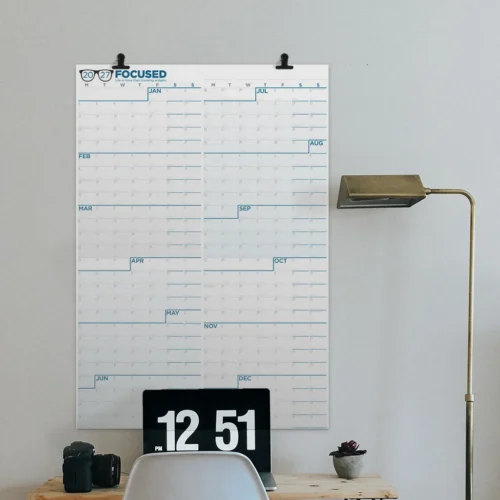
The Focused Wall Calendar for 2027 is now available. Mike and I have been working with the NeuYear folks for years to make a calendar that helps you see what you’re getting yourself into. Over the years, this calendar on my wall has gotten…
Listen & read notes →Intentional AI 11: AI Task Management
Chris tried letting AI choose his tasks and came away disappointed. Chris and I talk about human judgment, my return to paper journaling, and the work robots can help us do once we’ve decided what matters.
Listen & read notes →MindNode Comes to the iPhone Duo
MindNode has announced support for the iPhone Duo, with an update scheduled for today. The headline feature is Side by Side, which puts your mind map and outline together on the unfolded display. You can capture ideas in Outline mode on the outer display,…
Continue reading →Focused 267: A Menu of Opportunity
On this episode of Focused, Mike and I review Q3 and talk through our plans for the rest of the year. We look at keeping a menu of opportunities without turning every interesting idea into a commitment, and setting quarterly milestones for projects that…
Listen & read notes →