It’s time for the latest Lab Report from MacSparky, covering this week’s Apple news and updates…
This is a post for MacSparky Labs Members only. Care to join? Or perhaps do you need to sign in?

It’s time for the latest Lab Report from MacSparky, covering this week’s Apple news and updates…
This is a post for MacSparky Labs Members only. Care to join? Or perhaps do you need to sign in?
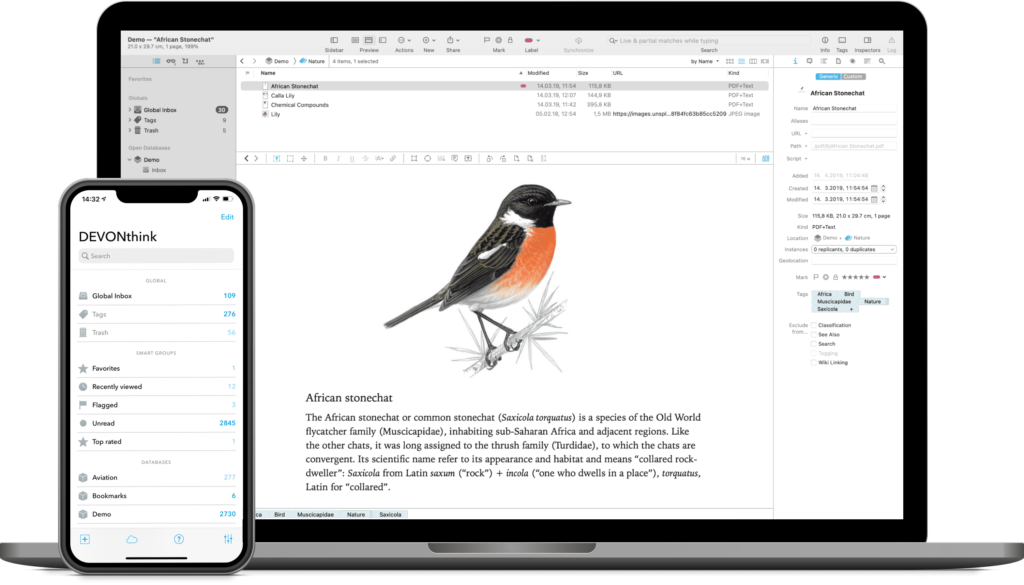
I often hear from listeners/readers looking for a research solution in the Mac ecosystem. My favorite app for this, without a doubt, is DEVONthink. DEVONthink is the most professional document and information management application for the Mac. It’s the one place for storing all your documents, snippets, or bookmarks, and working with them.
The Integrated A.I. assists you with filing and searching, while the extensive search language with advanced Boolean operators.
DEVONthink features a Flexible sync system that supports many cloud services – or lets you synchronize over the local network too – with everything securely encrypted. This gives you the choice for however syncing works best for you!
It has Smart rules and flexible reminders that let you automate all parts of your workflow and delegate boring, repeating tasks. Let DEVONthink automatically organize your data with rules you define!
DEVONthink’s AppleScript dictionary is one of the largest on the Mac. There’s no part of DEVONthink that can’t be automated. Extend DEVONthink’s functionality with your own commands by adding them to its Scripts menu.
Even templates can have scripts inside and you can set up new documents with data from placeholders, or inserted by your own AppleScript code.
And, of course, there’s so much more, from an iOS companion app, email archiving, scanning, or even an embedded web server for sharing your data securely with your team.
Nothing else can hold a candle to DEVONthink when it comes to working with actual files. Also, whether your are a daily DEVONthink user or simply interested, I recommend checking out their blog, where they routinely post tips and workflows for getting more from DEVONthink.
I find DEVONthink’s combination of innovative features and automation support irresistible. Interested? MacSparky readers can get a 20% discount on DEVONthink..
As the rumors continue to swirl around the looming 15-inch MacBook Air, some leakers are now reporting it will ship with the M2 Apple silicon rather than the earlier-rumored M3. That earlier rumor never made much sense to me unless Apple was willing to use the M3 in all new hardware from now on. Wouldn’t it be confusing if the Mac Pro was based on M2 while the less expensive, less powerful MacBook Air was already on M3?
Regardless, I’ve heard from many readers and listeners that are waiting for this computer to release. I suspect many people will want a bigger screen laptop that isn’t at MacBook Pro specs (and price).
If you ever buy anything on Amazon, their confirmation emails can get annoying. In this video, I explain how to make an Apple Mail rule to auto-file it for you…
This is a post for MacSparky Labs Members only. Care to join? Or perhaps do you need to sign in?
Here’s the video from the MacSparky Labs April Meetup. Topics include WWDC, new Apple hardware, and artificial intelligence…
This is a post for MacSparky Labs Members only. Care to join? Or perhaps do you need to sign in?
A recent study ranks the degree of phone addiction in different countries by finding the percentage of waking hours citizens spend with their phone screens.
The Philippines leads with people spending 32.53% of their days behind their small screens. The United States comes in at number 20 with 21.14%.
This is interesting, but I have questions about how they got their data. Also, I’d like to see these number broken down by age. Regardless of how they’re calculated, those numbers are too high. As humans, we do need time to be alone with our thoughts, and technology taken too far ruins that for a lot of folks.
I’ve mentioned a few times that I sometimes journal with an Apple Pencil in Good Notes. That’s raised several questions from the labs members, so here is a video walking you through my process… This is a post for MacSparky Labs Level 3 (Early Access) and Level 2 (Backstage) Members only. Care to join? Or perhaps do you need to sign in?
I’ve never been very good at professional groups. This largely stems from bad early experiences with such groups as a lawyer, where they exist more for sharing clients than ideas…
This is a post for MacSparky Labs Members only. Care to join? Or perhaps do you need to sign in?
Adam Tow is a longtime Apple user whose passions include development, photography, and the Newton. On this episode of Mac Power Users, he talks with Stephen and me about his various projects and the tools he uses to make them a reality.
This episode of Mac Power Users is sponsored by:

B.S. and A.S., as in Before SaneBox (B.S.) and After SaneBox (A.S.). There’s life before SaneBox, when your email is managing you, and life and your productivity after SaneBox, when you are efficiently managing your time and email.
SaneBox, this week’s sponsor at MacSparky, is an email management service that automatically sorts your email into folders based on each email’s importance. If you’re sill checking boxes and clicking on trash cans to deal with emails individually everyday … there’s a better way. With SaneBox, you will be able to see what you need to read now. The emails that you can deal with later are put in a folder called SaneLater, which has the distracting emails that can wait for you. Keep the disruptions out so you can focus on what what’s important to you.
You can try this out for yourself. Sign up for a free trial, and get a $10 credit you can use towards a SaneBox subscription. Give SaneBox a try and compare for yourself how you managed your email B.S. (that’s before SaneBox).