
Google’s AI Search Mode: What It Means for Users and Creators

Google recently announced the integration of an AI Mode into its search engine, powered by the Gemini 2.0 model. This update aims to provide more advanced and conversational responses directly in the search results.

Frankly, I’m not surprised. The only surprise is that it took Google this long. ChatGPT has had a similar feature for a while, and Perplexity is entirely built around this concept. The old Google search model — where you get a list of links and manually sift through them — is starting to feel outdated. It’s much easier to type a question and have AI read the web for you, distilling an answer. Clearly, Google sees the writing on the wall.

While AI search is convenient, it raises an important question: Should we rely solely on AI-generated answers, or should we take the time to review the original sources?

A good AI-powered search experience should transparently cite sources and allow users to verify the information themselves. Without clear attribution, there’s a risk of misinformation or misinterpretation. As consumers, we should demand better citation methods and more transparency from these AI search engines.

As for content creators like me, there is a risk in this transition. If AI summarizes my article but users never visit my website, site traffic drops. And when traffic drops, so does monetization and eventually the lights go out. Google claims that its AI-generated overviews will increase curiosity and drive more traffic to original sources, but I’m skeptical. (AP News)

Right now, I don’t have any easy answers for how creators should adapt. The entire ecosystem —advertising, subscriptions, and direct engagement —could shift significantly as AI search becomes more dominant.

Getting back to the point though, AI-powered search is where things are headed, and Google’s involvement solidifies that fact. But as both users and creators, we need to be mindful of transparency, accuracy, and the sustainability of the web.

Timing is Your Silent Partner in Productivity (Sponsor)

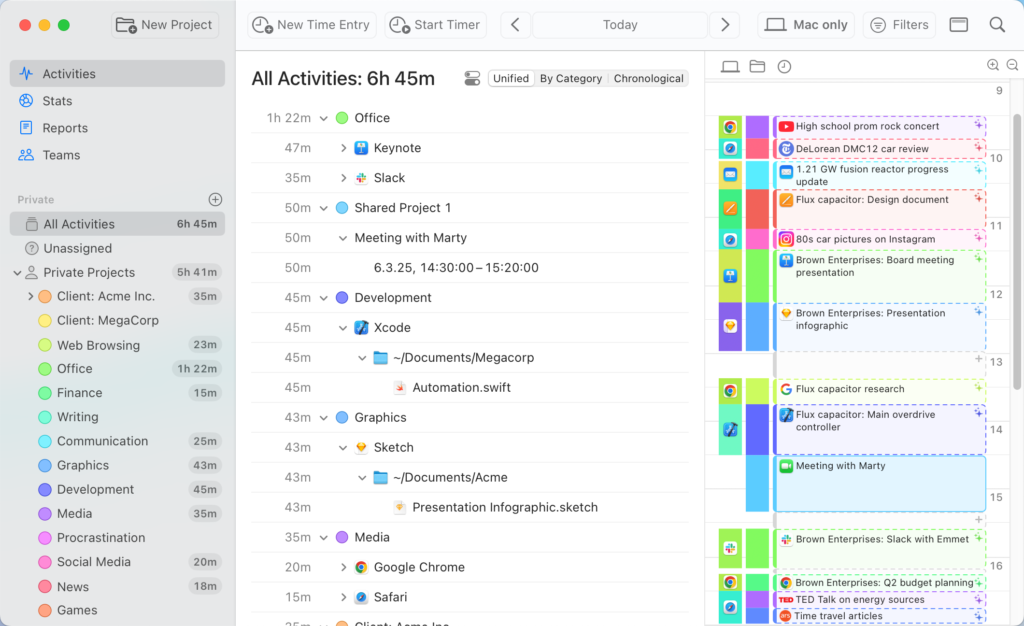
This week, MacSparky is delighted to feature Timing, the premier automatic time-tracking app for Mac users. Unlike traditional timers that require manual activation, Timing works seamlessly in the background, meticulously recording your activity across apps, websites, and documents. This ensures you gain an accurate and comprehensive overview of how your time is allocated, enabling you to identify productivity patterns and areas for improvement. Looking at your Timing log will let you know exactly what went down if your day ever gets away from you.

AI summaries show you how you spend your time

Key Features of Timing

  • Automatic Tracking: No need to remember to start or stop timers. Timing automatically logs your activities, capturing every detail without manual intervention.
  • Detailed Insights: Review precise data on the duration spent on specific applications, documents, or websites. For instance, distinguish between time dedicated to a client proposal in Word versus casual browsing on retail sites.
  • AI-Powered Summaries: Leverage artificial intelligence to receive concise summaries of your daily activities, helping you quickly grasp where your time goes without sifting through extensive logs.
  • Team Functionality: Timing also has teams support. Collaborate effortlessly by sharing projects, while managers can view aggregated time reports. Importantly, individual privacy is respected, as only manual time entries are visible to supervisors, ensuring a non-intrusive tracking environment.
  • Integration and Automation: Timing offers seamless integration with various tools and supports automation through features like Siri Shortcuts and a web API, enhancing your workflow efficiency.
  • Web App Access: Access your Timing data from anywhere using the Timing web app. Start and stop timers on the go, manage your team, and integrate with other services, ensuring flexibility and control over your time tracking.

Understanding how you spend your time is the first step toward enhanced productivity. By providing an unobtrusive and precise tracking system, Timing empowers you to make informed decisions about your time.

Apple’s New Child Safety Update: A Step in the Right Direction

Apple recently posted a white paper called Helping Protect Kids Online, where, among other things, they disclosed an upcoming software update that will make it easier to set up child accounts and provide age ranges to developers. I am sure part of the reason for this is pending legislation making platform owners and software developers more responsible for keeping kids out of apps they shouldn’t be in.

The dangers of social media for children are well documented in Jonathan Haidt’s book, The Anxious Generation. Haidt dives deep into how social media has contributed to rising anxiety and mental health struggles among young people. I’d recommend anybody interested in this topic give that book a read.

Social media companies have been doing a lot of finger-pointing at Apple and Google, arguing that platform owners should be responsible for ensuring that children don’t access inappropriate apps. Their claim is that the platform owner is in the best position to determine the age of the user. I’d agree with that.

However, I don’t think platform owners are exclusively responsible for fixing this problem. Indeed, part of me thinks that Facebook had better be careful what it wishes for. If Apple goes through with this update — and I fully expect them to — we will have a reliable age verification system on these devices. That means companies like Meta will have no excuse to claim they didn’t know children were using their applications.

I’m generally very privacy-sensitive, but in this case, I think the trade-off is worth it. Yes, Apple and app developers will know your age range, but at least we’ll have a system in place to help avoid the problems outlined in The Anxious Generation. I’m glad Apple is taking steps in this regard. But this isn’t just Apple’s responsibility. Other participants in this (specifically, social media companies and parents) need to do their part as well.

For parents, this is a good reminder to take an active role in your child’s online experience. With Apple making it easier to set up child accounts and manage access, now is the time to familiarize yourself with these tools. Technology can help, but ultimately, it’s a combination of smart tools and engaged parenting that will make the biggest difference.

OpenAI Announces GPT-4.5: A Stepping Stone to GPT-5

The AI march continues. OpenAI has announced that GPT-4.5 is now available for ChatGPT Pro and Enterprise users, with plans to roll it out to lower tiers in the coming weeks.

This new release feels like a stepping stone on the way to GPT-5, which is anticipated to be a significant leap forward but is still a ways off. One of the notable features of GPT-4.5 is enhanced “emotional intelligence.” While that might initially sound like marketing fluff, I’m reserving judgment until I’ve thoroughly tested it. I can say that in testing Anthropic’s Claude, there is an improvement over the ChatGPT 4o model.

Podcast listeners and MacSparky Labs members frequently ask me which AI model they should invest in. Having tested most of the major platforms, at this point, ChatGPT feels like the best all around. It delivers a robust combination of capabilities, making it the most versatile option available at this moment. But this space moves and changes quickly so not promises if that’s still true next week.

That said, I’m particularly curious to see whether GPT-4.5 narrows the gap between ChatGPT and rivals like Claude. I’ll be testing GPT-4.5 over the coming weeks and will report back on how it stacks up against other frontier models.

Mac Power Users 787: Revisiting Our Mac Menu Bars

It’s been a while, so Stephen and I use this episode of Mac Power Users to share what’s in our Macs’ menu bars, touching on some all-time great macOS apps.

This episode of Mac Power Users is sponsored by:

  • 1Password: Never forget a password again.
  • Ecamm: Powerful live streaming platform for Mac. Get one month free.
  • Google Gemini: Supercharge your creativity and productivity.
  • Incogni: Take your personal data back with Incogni! Use code MACPOWERUSERS with this link and get 60% off an annual plan.

The Pragmatic Explanation of Apple’s AI-Free iPad

A lot of folks are getting bent out of shape over the fact that the new entry-level iPad, released last week, doesn’t support Apple Intelligence. I don’t really see it that way. The goal of this iPad, in my opinion, is to keep it under $350. Apple sells these things by the thousands to school districts, businesses, and other large-scale purchasers. Adding the additional processor and memory to make Apple Intelligence work could push them past that magic number.

Moreover, I’m not sure these buyers even want artificial intelligence on their devices. Schools, for example, may have concerns about AI privacy and student usage. If you’re buying an iPad for a student, you don’t necessarily want it to help them write their homework. Likewise, corporate IT departments may be wary of AI-related security risks and prefer to keep things simple with a device that doesn’t process AI tasks on-device.

For those who do want Apple Intelligence, every other iPad now supports it, including the newly released iPad Air. The iPad Pro and iPad Air both run on Apple’s M-series chips, which meet the necessary requirements for Apple Intelligence, whereas the base iPad sticks with an A-series chip that lacks the needed processing power and memory.

I do think this may be the last iPad ever released without Apple Intelligence. As Apple refines its AI technology and improves efficiency, I expect that by the time we get to a 12th-generation iPad, it will likely support Apple Intelligence. But for now, I don’t think the lack of it on the new base iPad is as big a deal as people are making it out to be.