On this episode of Mac Power Users, Stephen and I explore four great applications for macOS users.
This episode of Mac Power Users is sponsored by:

On this episode of Mac Power Users, Stephen and I explore four great applications for macOS users.
This episode of Mac Power Users is sponsored by:
Rose and I are both fans of setups: automations that set your computer up to dive into doing your work. In this episode of Automators, we discuss multiple ways to set up a setup.
This episode of Automators is sponsored by:
Felipe Esposito wrote on 9to5Mac that it is no longer possible to buy the Apple SuperDrive through the Apple Store in the United States. While there has been no official announcement, it appears that Apple is selling out existing stock with no intention of making any more. The SuperDrive is a USB CD and DVD player that you can connect to your Mac with a USB-A port. Back in the day, they were essential with operating system and software were issued on CD.
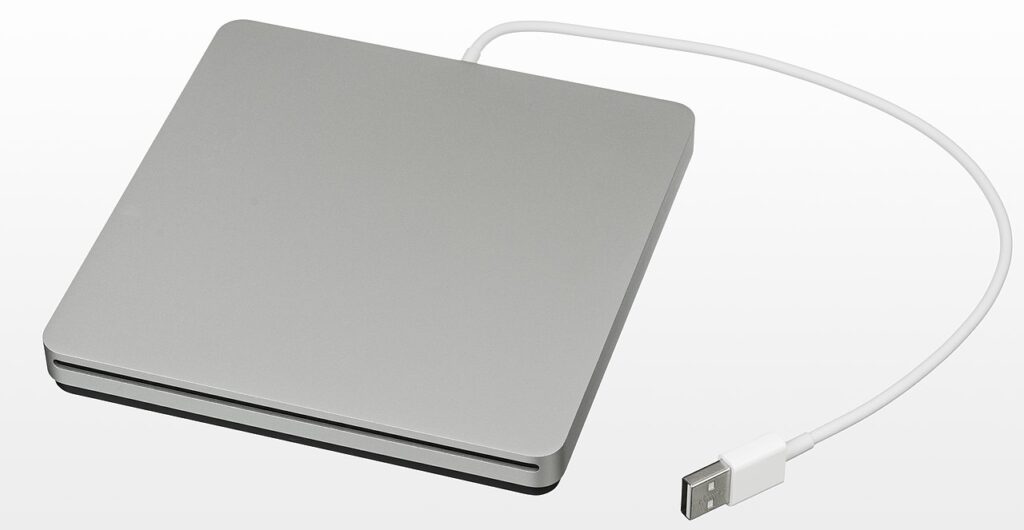
I have one in a drawer that I use infrequently. Just recently, I bought some Jamey Aebersold music books that came with accompanying tracks on CD. Using my SuperDrive, I installed the tracks into Apple Music and made them available for my next practice session.
While I understand that Apple feels it’s time to discontinue this 2008 product, I’m still a little sad. I bought mine around 2010, and now I’m just hoping I can get another 14 years out of it.
In this week’s episode of The Lab Report: Apple introduces Distraction Control with iOS 18 beta 5, Gatekeeper gets more invasive in macOS Sequoia, Humane’s AI pin challenges, and a poem by Robert Burns.
… This is a post for MacSparky Labs Members. Care to join? Or perhaps you need to sign in?
In this week’s episode of The Lab Report: Apple introduces Distraction Control with iOS 18 beta 5, Gatekeeper gets more invasive in macOS Sequoia, Humane’s AI pin challenges, and a poem by Robert Burns.… This is a post for the Early Access MacSparky Labs Members. Care to join? Or perhaps you need to sign in?
I frequently use environments in Vision Pro, which is one of the device’s best features. They can give you a context shift that is only possible with Vision Pro. I wish there were more of them.
Related to this, the Disney+ application got a nice addition with a new immersive environment in Iceland which was created by National Geographic, one of the Disney companies. It looks fantastic inside Vision Pro and again raises the question of why these environments are all bottled up inside individual applications. Apple needs to release more system-wide environments. I expect these app-based environments are similar enough to system-wide environments that we could have some donation-based system where I could use Disney’s Iceland outside the Disney+ application.
Of course, this would require some work on Apple’s part and agreement on the part of the app developers, but why wouldn’t they? If there is a technical limitation preventing this, my advice to Apple is to solve it. If there is a pride limitation on allowing third-party applications to donate environments, I advise Apple to get over it.
I know for a fact Apple has at least one middle-aged user who would love nothing better than to work in Apple Notes while sitting in the driver’s seat of his virtual Landspeeder. Why not bring him a little joy?
There is a rumor afloat that the next Apple Watch SE will be made of plastic. Mark Gurman recently stated that Apple using rigid plastic in the Apple Watch SE is “increasingly likely.” I think this is a good idea for several reasons:
The internal argument against a plastic watch would be that Apple doesn’t make things out of plastic. Hopefully, the powers that be see that Apple should make things out of whatever materials make the most sense for the product. And in the case of the Apple Watch SE, a plastic watch makes a ton of sense.
I’ve done some project planning scripts in the past but folks have been asking about doing it with Reminders. Here you go!… This is a post for MacSparky Labs Members only. Care to join? Or perhaps do you need to sign in?
We covered NotePlan on last week’s episode of the Mac Power Users. Here’s a video walkthrough of the NotePlan install I set up over the few months that we prepared for recording the show.… This is a post for the Early Access and Backstage MacSparky Labs Members. Care to join? Or perhaps you need to sign in?
Fantastical recently released a new feature called RSVP that lets you set a meeting and send out a link where people can RSVP their attendance. As the meeting organizer, this gives you a list of attendees and an easy way to contact them. I feel partially responsible for this new addition to my favorite calendar app because I’ve been needling Team Fantastical about adding something like this since I opened the MacSparky Labs, where Zoom events take place on a regular basis.