I recently hit entry number 5,000 in Day One. That’s over a decades worth of entries.


I recently hit entry number 5,000 in Day One. That’s over a decades worth of entries.
I have noted that Apple continues to make progress on its productivity application suite. Apple Notes is no longer a joke; it is a powerful tool that many people are using effectively. Reminders is also on an upswing. While certainly not a tier-one task manager, it has most of the features that people are looking for and continues to make yearly improvements.
Apple’s Calendar app is the exception, however. There’s been a lot of evolution in how we manage calendars, and Calendar has yet to keep up with any of it. While the application is acceptable for keeping track of dental and other appointments, even its touted Reminders integration (introduced in macOS Sequoia) is half-baked. A powerful calendar app can make a huge difference in our productivity if harnessed correctly. The problem with Calendar is that it doesn’t have any of the tools necessary to do so. Moreover, from the outside, it looks like Apple has no intention of ever adding those features.
Writer Bob Doto joins Mike and me on this episode of Focused to discuss creative systems, connecting ideas, and why you really should care about Zettelkasten.
This episode of Focused is sponsored by:
Sparky bought a thing. If you’re looking for a useful little magnetic tripod for your iPhone that folds up to the size of a stack of bank cards, I’ve got something for you.
… This is a post for MacSparky Labs Members. Care to join? Or perhaps you need to sign in?
Some rumors are circulating about Apple developing a fitness ring. I don’t know if it’s true, but there is a compelling case for a lighter fitness tracking device, whether it’s a ring or a lightweight bracelet. Because a bracelet would compete with the Apple Watch, it seems more likely to be a ring.
Just a few weeks ago, Apple’s Health VP emphasized the importance of obtaining fitness tracking information while sleeping. Many people wear their Apple Watch to bed, but not everyone does (I try to, but sometimes struggle). Even if only worn at night, a ring could address this issue.
One of the new macOS features this year is the integration of Reminders into the Calendar app. I spent some time poking around with it and came back pretty disappointed. In this video, I explain why.… This is a post for the Early Access and Backstage MacSparky Labs Members. Care to join? Or perhaps you need to sign in?
I’ve been thinking a lot lately about artificial intelligence. There are a lot of good uses for it, but the one everyone talks about is writing. People are transfixed by its ability to write college-level essays. As AI technology becomes increasingly sophisticated, more and more people are turning to it for help with everything from drafting emails to generating content for the internet. This repels me. While the efficiency of these tools can’t be denied, I’ve decided to take a different path for anything published under my name, and I want to share why.
Recently, I attended a friend’s wedding. One of the attendees made a moving speech. The speech was so good that I complimented the speaker later, who explained that ChatGPT wrote the speech and they had just read it. This revelation left me profoundly unsettled. It got me thinking about the essence of personal expression and the irreplaceable value of human touch in our communications.
Writing is more than just a means to convey information; it’s a way to connect on a deeply personal level. Whether celebrating a milestone with loved ones or sharing insights in this newsletter, these moments are opportunities to express our unique perspectives and emotions. When we delegate this task to an AI robot, no matter how sophisticated, we lose a piece of that human connection. It feels like a form of erasure — a diminution of our individuality and the personal stamp we leave on our work and the world.
For all MacSparky content, I’ve always aimed to keep things personal. The thoughts, tips, and stories I share are mine. They are crafted from my experiences, not generated from a dataset. While I use technology extensively to enhance productivity and creativity, the words under my name are always my own. I believe this authenticity is something you can’t replicate with algorithms.
Even if we get to a point where the computers do an objectively better job of writing than I can (which can be expected with more time), I still have no interest in it. I am not interested in a better product that is not my product.
I understand the appeal of using AI to lighten our loads; technology is a powerful tool. But there are boundaries that we should navigate thoughtfully. For me, personal expression is one such boundary.
When it comes to writing words, I use an alternative to a LLM (Large Language Model) and I call it the SLM, the Sparky Language Model.
I launched a scholarship program with the Productivity Field Guide, Stephen bought a new e-reader, and we both have spent some time in our Inboxes to bring feedback to Mac Power Users this week.
This episode of Mac Power Users is sponsored by:
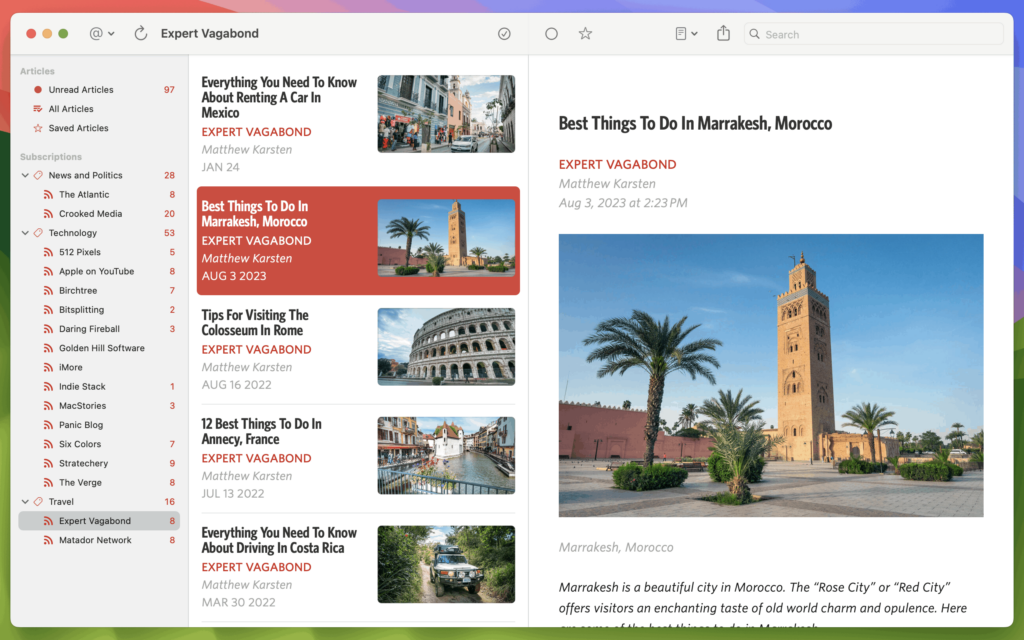
I’ve always considered Unread one of the most attractive RSS reader apps. However, there has never been a Mac version. Today marks the release of Unread for Mac. It’s an RSS reader made with taste. It has great typography, themes, search, and compatibility with the usual suspects. I love having this app on my Mac.
On this episode of Automators, Rosemary and I are joined by Kim Coloca-Madden to talk about how automating has improved her life and found its way into the heart of her family.
This episode of Automators is sponsored by: