Updated Apple Mail Link AppleScript

For years now, I’ve been iterating on an AppleScript to copy a link for the currently selected Apple Mail message to the clipboard. You can then paste the link elsewhere and get a link back to the source message.

This came up during a recent webinar on the Apple Productivity Field Guide. Since the last time I published this script, I’ve added a few new features:

  • Error handling plus a “Basso” sound upon error
  • Cleaner message description in the alert
  • A slight change to the way the link is created to help avoid link issues.

Enjoy!

tell application "Mail"
    try
        set selMessages to selection
        if (count selMessages) > 0 then
            -- Handle multiple message selection
            set msgCount to count selMessages
            if msgCount > 1 then
                display notification (msgCount as rich text) & " messages selected. Using first message." with title "Mail Link" sound name "Pop"
            end if

            set thisMsg to item 1 of selMessages
            set thisMsgID to message id of thisMsg
            set thisMsgURL to "message://%3C" & thisMsgID & "%3E"
            set the clipboard to thisMsgURL

            -- Truncate sender and subject for cleaner notifications
            set senderText to sender of thisMsg
            if length of senderText > 30 then
                set senderText to (rich text 1 thru 30 of senderText) & "..."
            end if

            set subjectText to subject of thisMsg
            if length of subjectText > 40 then
                set subjectText to (rich text 1 thru 40 of subjectText) & "..."
            end if

            display notification "From: " & senderText & " - " & subjectText with title "Message Link Copied" sound name "Pop"
        else
            display notification "Please select a message first." with title "No Message Selected" sound name "Basso"
        end if
    on error errMsg
        display notification errMsg with title "Error Copying Link" sound name "Basso"
    end try
end tell
Apple Mail’s New Sorting Features

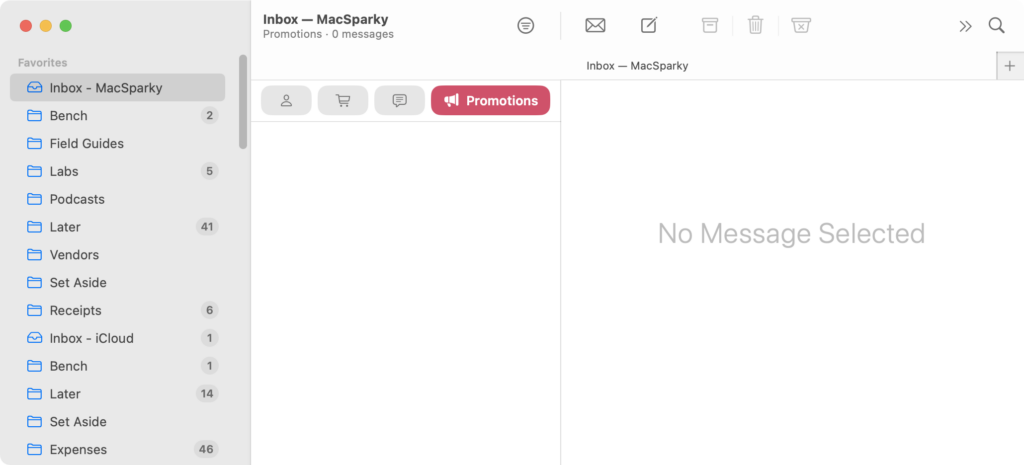
Apple’s latest operating system betas have finally brought the new Mail sorting and redesign features to iPad and Mac. While we’ve had time to experience these features on iPhone, their arrival on all platforms gives us a complete picture of Apple’s vision for email management.

apple mail window with no selected message, showing the new Apple Intelligence sorting feature with the Promotions label in red. No message is selected.

The response has been interesting. Power users generally aren’t impressed, arguing that web-based mail sorting tools and services like SaneBox offer far more sophisticated features. They’re right. However, I’ve noticed something different among casual users who have never experienced mail sorting before: they like Apple’s new email sorting.

I decided to experiment with this myself. I turned off all my fancy email sorting rules for my personal account and switched to Apple Mail’s new system. After some initial training, I’ve found it works surprisingly well. Sure, my MacSparky email still requires more advanced sorting that’s beyond what Apple offers, but for personal correspondence, this new system hits a sweet spot. Plus, there’s the added benefit of privacy.

This update represents a shift in Apple’s Mail development strategy. For years, they focused primarily on infrastructure improvements, making the app more stable and secure. It’s refreshing to see them adding new features again, even if they aren’t targeting power users. Not every feature needs to cater to the most demanding users, and sometimes simplicity, combined with privacy, is probably where Apple should be aiming.

Apple Mail Update Coming to the Mac and iPad

The current rumor via Mark Gurman is that Apple Mail will get the expected redesign and update with macOS 15.4 beta and the upcoming iPad 18.4 beta. I sure hope so.

While I’ve found the rudimentary email filtering they added on the iPhone useful for mail triage, I don’t think it can be judged until it’s on the Mac, at least for me. Apple Mail has long been overdue for an update and it’s nice to see some progress made.

While you’re at it, Apple, two requests:

  • A Print-to-PDF workflow on mobile devices that doesn’t feel like we’re performing a magic trick.
  • A simple way to extract a link to an email message on mobile devices.

That is all. For now.

Apple Mail and Flags

apple's mail icon, aligned right of the text it is next to.

For years now I’ve had a secret struggle with flag count in Apple Mail. Every year we get a new set of betas and every year I try again, hoping that I can reliably use flags in Apple Mail. However, before long, the count always gets off.

What I mean is I may show 17 flagged emails on iPhone, 6 on my Mac, and 22 on iPad. For whatever reason it has been very difficult for Apple to keep that flag count reliable and in sync. I hesitate to make this post so early but so far, throughout beta 1 and now beta 2 of this year’s operating system updates, Apple Mail’s flag count has remained consistent.

Assigning flags is a lot easier than moving emails to separate folders. Moreover, since I have a few different email accounts, flags can work across all of them very easily. So my idea is to use flags as a sort of triage mechanism — but only if I can rely upon the flag count to work.

This year, for the first time, so far so good.

Using the Stream Deck with Apple Mail (MacSparky Labs)

I’ve heard from several members asking how I’m using the Stream Deck with Apple Mail. Here’s an explanation, along with downloadable links to referenced scripts. Can someone actually fill up a 32-button Stream Deck with Apple Mail? Yep…

This is a post for MacSparky Labs Level 3 (Early Access) and Level 2 (Backstage) Members only. Care to join? Or perhaps do you need to sign in?

Automating Loading Remote Content in Apple Mail with Keyboard Maestro (MacSparky Labs)

There is a new feature in Apple Mail that holds off on loading remote content in new mail messages until you push a button. While I like the feature, it gets annoying when you have to mouse over to click it while your hands are happily parked on the keyboard …

This is a post for MacSparky Labs Tier 2 (Backstage) and Tier 3 (Early Access) Members only. Care to join? Or perhaps do you need to sign in?

Using AppleScript to Open a Specific Mailbox in Apple Mail (MacSparky Labs)

Shortcuts for iOS 16 is adding a feature that lets you open a specific Mailbox in Apple Mail on your iPhone or iPad. Shortcuts for Ventura, however, doesn’t have that function. What gives? Never fear. Sparky figured out a way to duplicate the feature using AppleScript…

This is a post for MacSparky Labs Level 3 (Early Access) and Level 2 (Backstage) Members only. Care to join? Or perhaps do you need to sign in?

Will MailKit Save Mail.app?

One of the announcements to come out of WWDC this year is a new framework for third parties to create plugins for Apple’s Mail.app called MailKit. Mail.app has been stagnant for a long time. While the app continues to get support for email rendering and improvements to its basic functions (like search), that’s about it.

Most who use it day-to-day have gotten somewhat accustomed to how dated it feels. Making a stable, feature-rich email application isn’t easy. Most third-party developers seem to fall down on the “stability” part. Apple nails that but seems uninterested in the “feature-rich” part.

I hope that this new MailKit will allow third-party developers to pick up that slack. There is already a rich ecosystem of Apple Mail plugins, but I’ve become increasingly leary about using and recommending them during recent years. My concern was that Apple could, at any point, pull the plug on Apple Mail plugins.
A few years ago, I talked to an Apple engineer at WWDC who explained that mail plugins, historically at least, represented a security vulnerability, and Apple is very much interested in removing any security holes. The good news is that the announcement of MailKit means Apple is not pulling the plug on plugins but instead found a safe way for them to continue while keeping the platform secure.

This new sense that mail plugins have a future path and will continue to exist makes it easier for me to use them. I hope this also encourages other developers to get off the sidelines and explore developing new and helpful Mail.app plugins. Hopefully, another benefit will be that in future updates to macOS, plugin developers won’t have to re-invent the wheel every year. One of my favorite plugins is SmallCubed’s MailSuite, but every year I have to turn it off on beta machines and often for the first few months after a macOS update releases.

Unfortunately, MailKit is only for the Mac, leaving Apple’s Mail app on the iPhone and iPad sad and lonely, still without even the dignity of a sharing button. I’d love to see MailKit also make its way to iOS and iPad OS, but I’m not holding my breath.