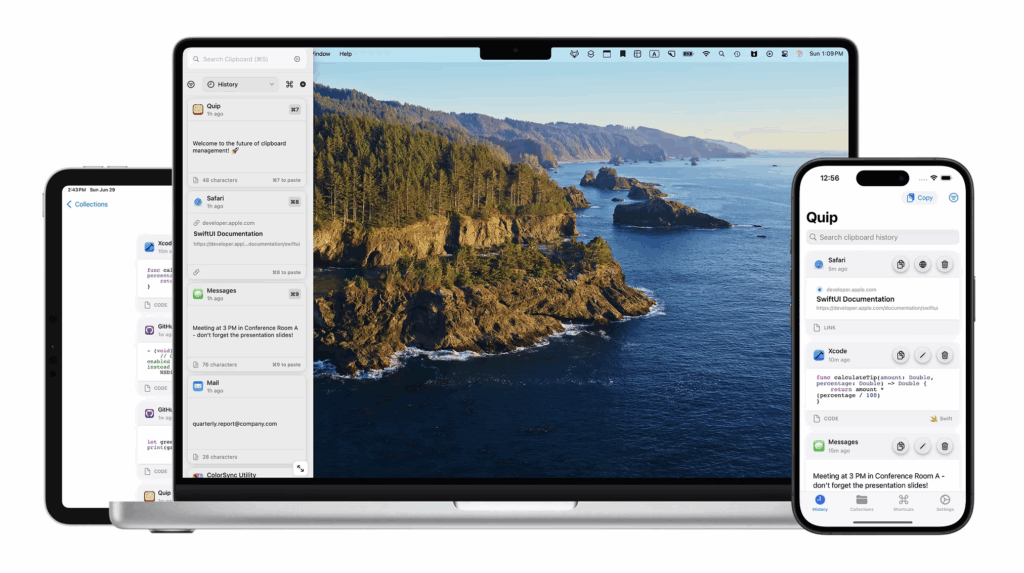
Quip: The Clipboard Manager That Actually Stays Organized (Sponsor)

This week’s sponsor is Quip, and it’s different from every other clipboard manager I’ve tried.

Most clipboard managers work the same way: they save everything you copy, and after a few days, you’re scrolling through a junk drawer of random text snippets, URLs you’ll never visit again, and those annoying 2FA codes that somehow stick around forever. Quip solves this with something BZG Apps calls “Quip Intelligence”—completely local AI that keeps your clipboard history actually useful.

Here’s what that means in practice. The app automatically removes duplicate entries so you’re not seeing the same email address five times. It strips tracking parameters from URLs before saving them. It filters out those temporary authentication codes that would otherwise clutter your history. And it learns from your behavior to skip the stuff you never actually reuse. All of this happens on your device, so nothing leaves your Mac, iPhone, or iPad.

What really stands out is the Smart Collections feature. You can set up rules that automatically organize your clipboard items—all your code snippets in one collection, research links in another, client email addresses in a third. The app handles the sorting, so you can actually find what you’re looking for without scrolling through chaos.

The keyboard extension on iOS deserves special mention. You can access your entire clipboard history from any app without switching contexts. Combined with the Super Shortcuts feature (which turns any clipboard item into a text expansion trigger), it’s remarkably efficient once you get it set up.

Quip is available for $19.99 as a one-time purchase for Mac, or $14.99/year for the full ecosystem across Mac, iPhone, and iPad. There’s a two-week free trial if you want to see how it fits into your workflow.
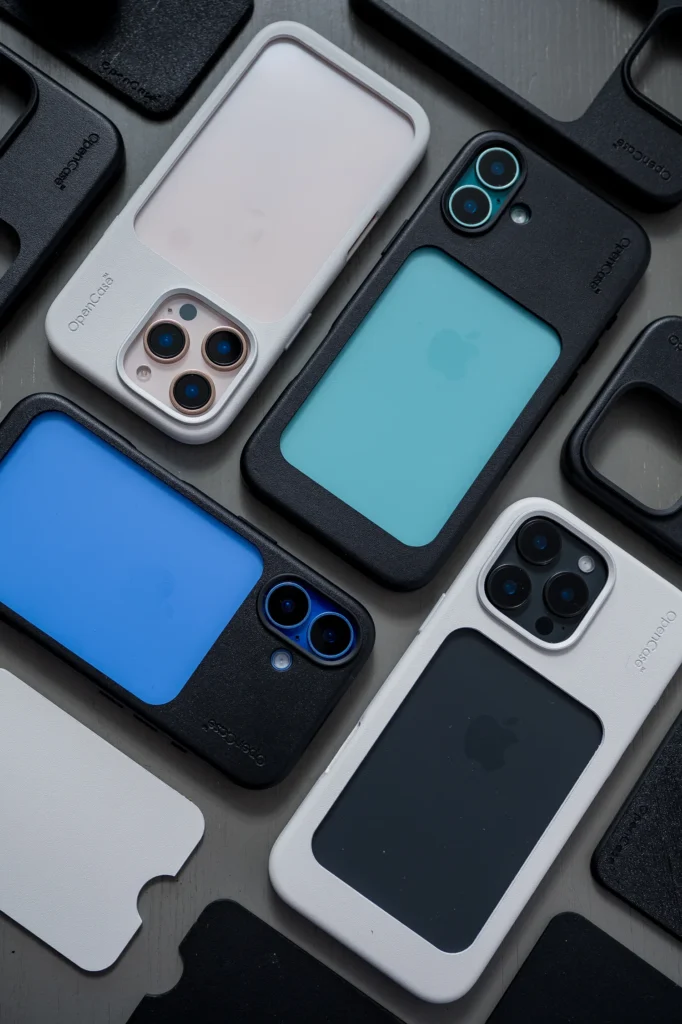

OpenCase, A Clever Solution for Your iPhone (Sponsor)

This week MacSparky is sponsored by OpenCase, and I want to tell you about a genuinely clever approach to iPhone cases.

We all want to use MagSafe accessories, but traditional cases add bulk. Stack a MagSafe wallet or charger on top of a case, and you’re carrying around a thick sandwich of phone, case, and accessory. Plus, those accessories slide around or fall off at the worst moments.

OpenCase solves this with a patented design that has an actual open space in the back of the case. Instead of stacking your MagSafe accessories on top, they sit inside that space. The result is a thinner, lighter setup that’s more secure and charges more efficiently.

The open space creates a border that cradles MagSafe accessories and stops them from sliding around. You can also wedge an accessory like a wallet into that space to create an impromptu stand—handy when you’re traveling or working away from your desk. And because there’s nothing between your iPhone and your MagSafe charger, you’re following Apple’s own wireless charging guidelines for optimal performance.

I appreciate that OpenCase isn’t trying to lock you into their ecosystem. They make accessories designed specifically for that open space, but the case works with most third-party MagSafe accessories too. And here’s a bonus: when you’re not using an accessory, you can actually see the color of your iPhone through that open space. If you bought a gorgeous new iPhone color, why hide it completely?

The new iPhone 17 is here, and if you’re planning to use MagSafe accessories, OpenCase is worth a look. Head over to TheOpenCase.com and use promo code SPARKY for 10% off. That’s TheOpenCase.com with promo code SPARKY for 10% off.

Direct Mail: Email Marketing That Feels at Home on Your Mac (Sponsor)

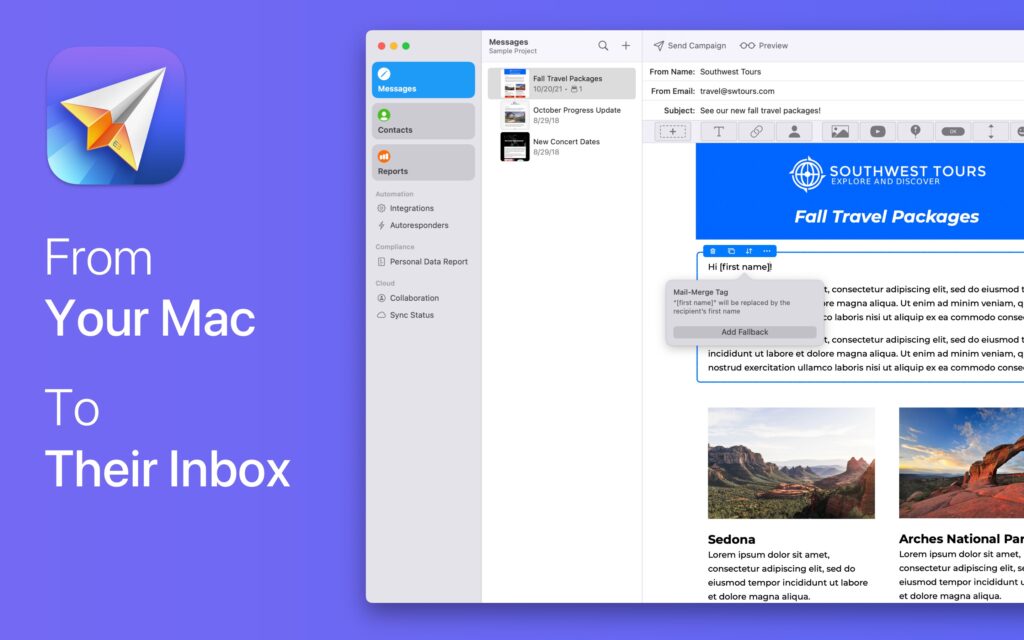
This week MacSparky is sponsored by Direct Mail for Mac. If you run a business, a side hustle, a podcast, or just want to stay in touch with a community, you know how important great email marketing can be.

The brand-new Version 7 is a huge leap forward. This update brings a host of new features, including a reimagined user interface, smarter list management, powerful email sign-up forms, upgraded reporting, and all-new tools to help your emails stand out. Whether you’re sending to 10 people or 10,000, Direct Mail gives you the tools to do it professionally and painlessly.

If you’ve ever been frustrated with clunky email marketing websites, or just want something that feels right at home on your Mac, I encourage you to check out Direct Mail. It’s free to download and try, and there’s no subscription required if you prefer a pay-as-you-go option. You can be up and running with your first campaign in just minutes. Get started today and grow your audience with powerful, Mac-first email marketing tools.

Listen Later: Get Your Articles as Podcasts (Sponsor)

This week, MacSparky is pleased to welcome back Listen Later as a sponsor. Listen Later is a service that transforms articles, emails, and PDFs into personalized podcast episodes using their advanced AI narrator. This allows you to listen to your reading list during commutes, workouts, or any time you’re on the go.

This service really scratches an itch for me. There is so much good long-form content out there these days and consuming it while washing the dishes, walking the dog, or on a long commute is very satisfying.

Their AI not only narrates but brings life to the content with a quality that stands out among AI voices. You can access your personalized podcast episodes on all devices through any podcast app, ensuring you stay connected with your preferred content anytime and anywhere.

Beyond articles, Listen Later can also convert emails and PDFs into podcasts, making it perfect for transforming work documents, newsletters, or any textual content into listenable formats. Additionally, Listen Later can translate content into multiple languages, making global content accessible and enjoyable in your preferred language.

Sign up for the service today, and you’ll receive $2 of free credit, providing an easy way to try it out for yourself at no risk. Experience the convenience of turning your reading list into a personalized podcast with Listen Later.

Fantastical: The Calendar That Actually Thinks Like You Do (Sponsor)

Today’s sponsor is Fantastical from Flexibits. I want to share why their approach to calendar management continues to impress me after all these years.

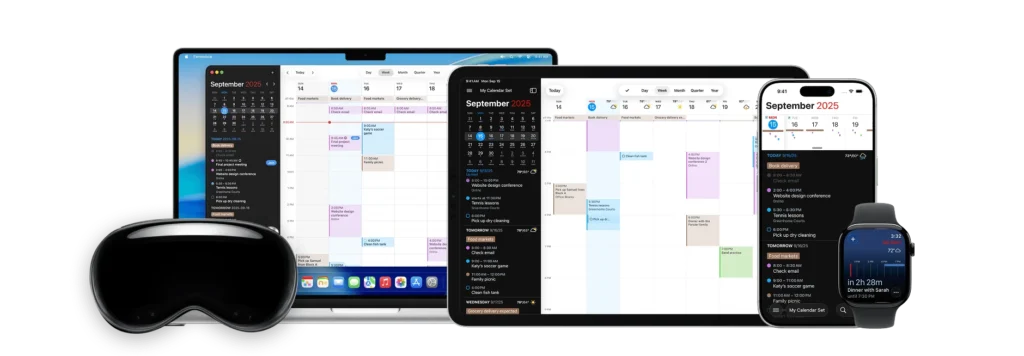
You know that moment when you’re trying to schedule something and your brain works faster than your calendar app? That’s where Fantastical shines. I can type “Coffee with Sarah next Tuesday at 10am at Blue Bottle” and Fantastical just gets it. The natural language processing isn’t just a party trick. It fundamentally changes how I interact with my calendar. No more clicking through date pickers and dropdown menus when my brain’s already moved on to the next task.

What really sets Fantastical apart for productivity nerds like us is the depth of customization. Calendar Sets let me switch contexts instantly—I’ve got different sets for deep work days, meeting-heavy days, and weekends. The app automatically knows which calendars I need to see based on where I am or what time it is. It’s like having multiple calendar personalities that adapt to my workflow.

The integration game is strong too. Beyond the usual suspects, Fantastical plays beautifully with Shortcuts, which means I’ve automated calendar creation for recurring project types. The app handles conference calls brilliantly—whether it’s Zoom, Teams, or Google Meet, the join button is right there when I need it.

One feature that doesn’t get enough love: the weather integration. Knowing if tomorrow’s meeting requires an umbrella or if that outdoor event might get rained out helps me plan better. It’s these thoughtful touches that make Fantastical feel less like software and more like a really competent assistant.

If you’re ready to stop fighting with your calendar and start working with it, check out Fantastical. They offer a free trial so you can experience the difference yourself.

Timing: Stay on Top of Your Time Without Timers (Sponsor)

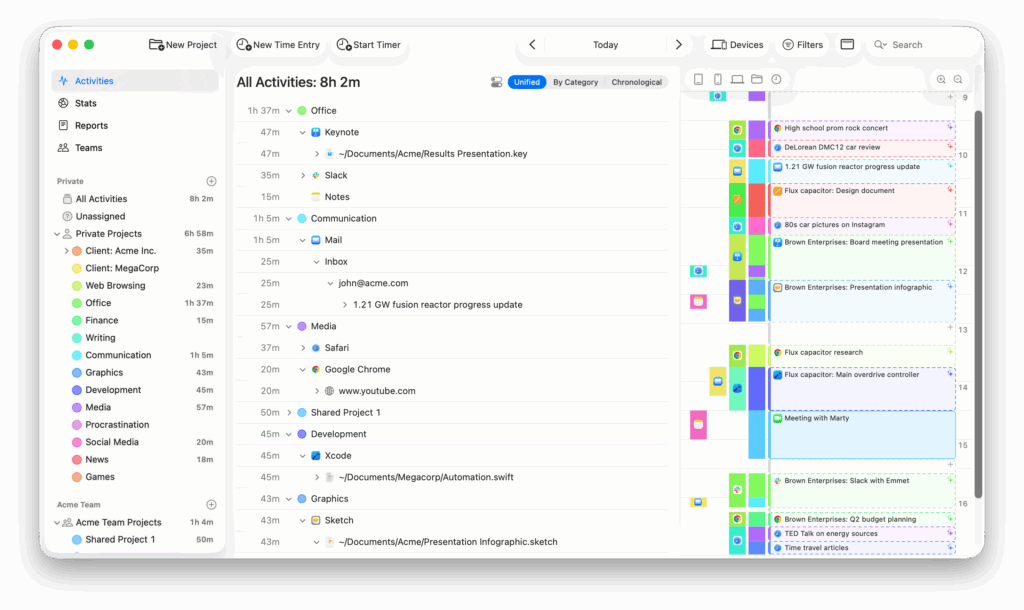
This week, MacSparky is delighted to feature Timing, the premier automatic time-tracking app for Mac users. As we march toward the macOS 26 Tahoe release, Timing got a nice update and now looks great with Liquid Glass. Just look at this screenshot:

Unlike traditional timers that require manual activation, Timing works seamlessly in the background, meticulously recording your activity across apps, websites, and documents. This ensures you gain an accurate and comprehensive overview of how your time is allocated, enabling you to identify productivity patterns and areas for improvement. Looking at your Timing log will let you know exactly what went down if your day ever gets away from you.

Key Features of Timing

  • Automatic Tracking: No need to remember to start or stop timers. Timing automatically logs your activities, capturing every detail without manual intervention.
  • Detailed Insights: Review precise data on the duration spent on specific applications, documents, or websites. For instance, distinguish between time dedicated to a client proposal in Word versus casual browsing on retail sites.
  • AI-Powered Summaries: Leverage artificial intelligence to receive concise summaries of your daily activities, helping you quickly grasp where your time goes without sifting through extensive logs.
  • Team Functionality: Timing also has teams support. Collaborate effortlessly by sharing projects, while managers can view aggregated time reports. Importantly, individual privacy is respected, as only manual time entries are visible to supervisors, ensuring a non-intrusive tracking environment.
  • Integration and Automation: Timing offers seamless integration with various tools and supports automation through features like Siri Shortcuts and a web API, enhancing your workflow efficiency.
  • Web App Access: Access your Timing data from anywhere using the Timing web app. Start and stop timers on the go, manage your team, and integrate with other services, ensuring flexibility and control over your time tracking.

Understanding how you spend your time is the first step toward enhanced productivity. By providing an unobtrusive and precise tracking system, Timing empowers you to make informed decisions about your time.

DEVONthink – Your Research Command Center (Sponsor)

One question I frequently get from MacSparky readers and MPU listeners is: “What’s the best tool for managing research on the Mac?” My answer is always DEVONthink, and this week I’m happy to have them as a sponsor.

Let me tell you about my favorite new feature: the Mentions inspector. Think of it as your digital librarian that automatically discovers connections in your research. When you select a document, Mentions shows you everywhere its title appears across your database, complete with context. I’ve found this invaluable for uncovering relationships in my research that I didn’t even know existed.

official application icon for DEVONthink

But that’s just scratching the surface. Here’s what makes DEVONthink my go-to research tool:

  • Its AI engine learns how you organize and helps file new documents
  • A powerful search language that lets you construct precise queries
  • Rock-solid sync across devices with end-to-end encryption
  • Smart rules and reminders to automate your workflow
  • Rich AppleScript support for deep automation (I use this constantly)

The DEVONthink team keeps pushing the envelope with thoughtful improvements. Recent updates have brought enhanced PDF annotation, seamless Evernote import capabilities, and expanded Markdown support. This continuous evolution is why DEVONthink remains central to my research workflow.

If you’re looking to level up your research game, DEVONthink is offering MacSparky readers a 20% discount. It’s the tool I trust with my own research, and I think you’ll find it just as indispensable.

My thanks to DEVONthink for supporting MacSparky.

Direct Mail: Email Marketing That Feels at Home on Your Mac (Sponsor)

This week MacSparky is sponsored by Direct Mail for Mac. If you run a business, a side hustle, a podcast, or just want to stay in touch with a community, you know how important great email marketing can be.

The brand-new Version 7 is a huge leap forward. This update brings a host of new features, including a reimagined user interface, smarter list management, powerful email sign-up forms, upgraded reporting, and all-new tools to help your emails stand out. Whether you’re sending to 10 people or 10,000, Direct Mail gives you the tools to do it professionally and painlessly.

If you’ve ever been frustrated with clunky email marketing websites, or just want something that feels right at home on your Mac, I encourage you to check out Direct Mail. It’s free to download and try, and there’s no subscription required if you prefer a pay-as-you-go option. You can be up and running with your first campaign in just minutes. Get started today and grow your audience with powerful, Mac-first email marketing tools.

DEVONthink – Your Research Command Center (Sponsor)

One question I frequently get from MacSparky readers and MPU listeners is: “What’s the best tool for managing research on the Mac?” My answer is always DEVONthink, and this week I’m happy to have them as a sponsor.

Let me tell you about my favorite new feature: the Mentions inspector. Think of it as your digital librarian that automatically discovers connections in your research. When you select a document, Mentions shows you everywhere its title appears across your database, complete with context. I’ve found this invaluable for uncovering relationships in my research that I didn’t even know existed.

official application icon for DEVONthink

But that’s just scratching the surface. Here’s what makes DEVONthink my go-to research tool:

  • Its AI engine learns how you organize and helps file new documents
  • A powerful search language that lets you construct precise queries
  • Rock-solid sync across devices with end-to-end encryption
  • Smart rules and reminders to automate your workflow
  • Rich AppleScript support for deep automation (I use this constantly)

The DEVONthink team keeps pushing the envelope with thoughtful improvements. Recent updates have brought enhanced PDF annotation, seamless Evernote import capabilities, and expanded Markdown support. This continuous evolution is why DEVONthink remains central to my research workflow.

If you’re looking to level up your research game, DEVONthink is offering MacSparky readers a 20% discount. It’s the tool I trust with my own research, and I think you’ll find it just as indispensable.

My thanks to DEVONthink for supporting MacSparky.

Upgrade Your Software Stack with SummerFest (Sponsor)

One of the things I love most about being part of the Mac community is discovering thoughtfully crafted software from independent developers. These aren’t apps churned out by massive corporations—they’re passion projects built by small teams who genuinely care about solving real problems for people like us.

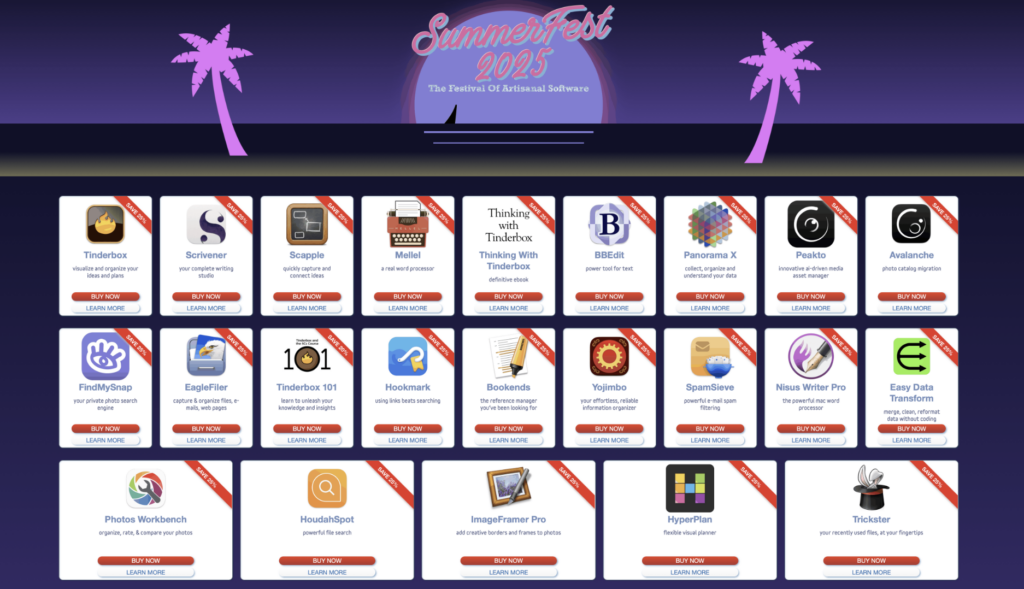
The Artisanal Software Festival is happening right now, and it’s a fantastic opportunity to support some truly exceptional indie developers while picking up tools that can transform how you work. This isn’t one of those overwhelming bundles with dozens of apps you’ll never use. Instead, it’s a curated collection of professional-grade software for writers, researchers, and creative professionals.

Some standouts that caught my attention (and that I’ve used): Tinderbox for complex note-taking and idea mapping, Scrivener for long-form writing projects, HoudahSpot for lightning-fast file searching, and BBEdit—the legendary text editor that’s been a Mac staple for decades. There’s also Bookends for reference management, EagleFiler for organizing all your digital information, and SpamSieve for keeping your inbox clean.

These are all fantastic apps and made by teams that prioritize sustainability over growth-at-all-costs, which means better long-term support and more thoughtful feature development.

The festival is running for a limited time with genuine discounts—no artificial markups or gimmicky bundles. Just quality software at fair prices, with full support and upgrade privileges included.

If you’ve been thinking about upgrading your toolkit or supporting indie developers who are keeping the Mac software ecosystem vibrant and innovative, this is a perfect opportunity to do both. Check out the Artisanal Software Festival and see what catches your eye.