
One of the new Apple Intelligence features is the ability to summarize webpages in Safari. In this video, I demonstrate this new feature, part of iOS 18.1 beta.
… This is a post for MacSparky Labs Members. Care to join? Or perhaps you need to sign in?
Get Organized with DEVONthink (Sponsor)
There are a lot of ways to organize digital assets, but there is one that can do the job with panache for everyone, whether you are dealing with utility bills or doctoral thesis resources, and that’s this week’s sponsor, DEVONthink. DEVONthink is the most professional document and information management application for the Mac. It’s the one place for storing all your documents, snippets, or bookmarks, and working with them.
The integrated AI engine assists you with filing and searching, while the extensive search language includes advanced Boolean operators.
DEVONthink features a flexible sync system that supports many cloud services — or lets you synchronize over your local network — with everything securely encrypted. This gives you the choice for whichever syncing works best for you!
It has Smart rules and flexible reminders that let you automate all parts of your workflow and delegate boring, repeating tasks. Let DEVONthink automatically organize your data with rules you define!
DEVONthink’s AppleScript dictionary is one of the best on the Mac. There’s no part of DEVONthink that can’t be automated. Extend DEVONthink’s functionality with your own commands by adding them to its Scripts menu.
Even templates can have scripts inside and you can set up new documents with data from placeholders, or inserted using your own AppleScript code.
DEVONthink just continues to get better. In the latest update they improved PDF annotation, Evernote import, Markdown functionality, and added even more AppleScript and JavaScript automation.
I find DEVONthink’s combination of innovative features and automation support irresistible. Interested? MacSparky readers can get a 20% discount on DEVONthink.
Build an AppleScript using ChatGPT
Here’s a tutorial on how you can use ChatGPT to build an AppleScript script that exports a list of tasks in OmniFocus to a Markdown-formatted list.
… This is a post for MacSparky Labs Members. Care to join? Or perhaps you need to sign in?
The Future of Search
OpenAI recently announced they’re working on a new product called SearchGPT. It’s currently in prototype, and there is a waitlist to get into an eventual beta. This looks very similar to what Perplexity is doing: using artificial intelligence tools to conduct web searches in response to your questions and providing you, instead of a collection of links, a simple answer with links to the resources and justification for the answer.
I was invested in Perplexity until it became apparent they were scraping parts of the web without anybody’s permission. That doesn’t change the fact that this type of service, done right, is superior to traditional search. I think it is only a matter of time before most of us search this way.
Of course, OpenAI is getting in on the action. Google is already trying the same thing. At this point, the race is on to provide this new method of getting answers out of the internet faster and more accurately. I don’t know who will make the best version of this widget, but I sure hope it is a horse race. When Google emerged as the search engine triumphant, we stopped getting real competition for decades.
I bring this up partly because of the recent antitrust ruling against Google. I’ve heard from several readers asking if Apple will create its own search engine if they’re no longer allowed to make that sweet deal with Google. I don’t think so.
Search engines are yesterday’s news. If I had to bet a nickel, though, Apple will ultimately partner with AI Search engines the same way it is now partnering with Large Language Models companies.
Apple could try to build its own AI search technology, but from the outside, it looks like it’s not far enough along to make anything competitive with the work being done by others. Also, even if Apple could make something equal to or better than other AI Search technologies, using it exclusively would likely land it in regulatory hot water.
Mac Power Users 757: Four Great Mac Utilities
On this episode of Mac Power Users, Stephen and I explore four great applications for macOS users.
This episode of Mac Power Users is sponsored by:
Automators 161: Setup App Showdown
Rose and I are both fans of setups: automations that set your computer up to dive into doing your work. In this episode of Automators, we discuss multiple ways to set up a setup.
This episode of Automators is sponsored by:
- ExpressVPN: High-Speed, Secure & Anonymous VPN Service. Get an extra three months free.
- LinkedIn Jobs: Find the qualified candidates you want to talk to, faster. Post your job for free today.
Farewell, Apple SuperDrive
Felipe Esposito wrote on 9to5Mac that it is no longer possible to buy the Apple SuperDrive through the Apple Store in the United States. While there has been no official announcement, it appears that Apple is selling out existing stock with no intention of making any more. The SuperDrive is a USB CD and DVD player that you can connect to your Mac with a USB-A port. Back in the day, they were essential with operating system and software were issued on CD.
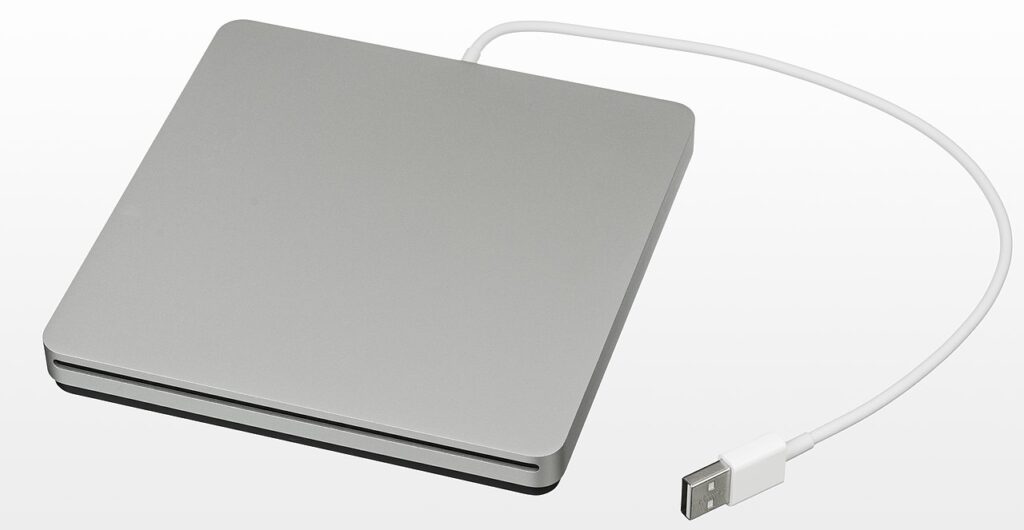
I have one in a drawer that I use infrequently. Just recently, I bought some Jamey Aebersold music books that came with accompanying tracks on CD. Using my SuperDrive, I installed the tracks into Apple Music and made them available for my next practice session.
While I understand that Apple feels it’s time to discontinue this 2008 product, I’m still a little sad. I bought mine around 2010, and now I’m just hoping I can get another 14 years out of it.
The Lab Report for August 9, 2024
In this week’s episode of The Lab Report: Apple introduces Distraction Control with iOS 18 beta 5, Gatekeeper gets more invasive in macOS Sequoia, Humane’s AI pin challenges, and a poem by Robert Burns.
… This is a post for MacSparky Labs Members. Care to join? Or perhaps you need to sign in?
The Lab Report for August 9, 2024 (Early Access)
In this week’s episode of The Lab Report: Apple introduces Distraction Control with iOS 18 beta 5, Gatekeeper gets more invasive in macOS Sequoia, Humane’s AI pin challenges, and a poem by Robert Burns.… This is a post for the Early Access MacSparky Labs Members. Care to join? Or perhaps you need to sign in?
More Vision Pro Environments, Please
I frequently use environments in Vision Pro, which is one of the device’s best features. They can give you a context shift that is only possible with Vision Pro. I wish there were more of them.
Related to this, the Disney+ application got a nice addition with a new immersive environment in Iceland which was created by National Geographic, one of the Disney companies. It looks fantastic inside Vision Pro and again raises the question of why these environments are all bottled up inside individual applications. Apple needs to release more system-wide environments. I expect these app-based environments are similar enough to system-wide environments that we could have some donation-based system where I could use Disney’s Iceland outside the Disney+ application.
Of course, this would require some work on Apple’s part and agreement on the part of the app developers, but why wouldn’t they? If there is a technical limitation preventing this, my advice to Apple is to solve it. If there is a pride limitation on allowing third-party applications to donate environments, I advise Apple to get over it.
I know for a fact Apple has at least one middle-aged user who would love nothing better than to work in Apple Notes while sitting in the driver’s seat of his virtual Landspeeder. Why not bring him a little joy?