
It’s time for some questions and answers in the MacSparky Labs. Topics include the Vision Pro, OmniFocus 4, Obsidian, DEVONthink…This is a post for MacSparky Labs Members. Care to join? Or perhaps you need to sign in?
Capture Your Ideas Easily with Whisper Memos
I’m pleased to welcome a new sponsor to MacSparky: Whisper Memos.
I love this app’s blend of utility and simplicity. You just open the app and start talking. It uses AI technologies to get an excellent transcription of your words, separated logically into paragraphs. You then get an email with an AI-generated subject line, so you’ve got your words captured with no extra effort. It’s that simple. You talk, and your words are reliably transcribed and captured.
Whisper Memos also shines on Apple Watch, and if like me you’re sporting the Apple Watch Ultra, you can set the Action Button to start a recording in the app. You can also add a complication on your Watch face; no need to open the app, just tap and talk!
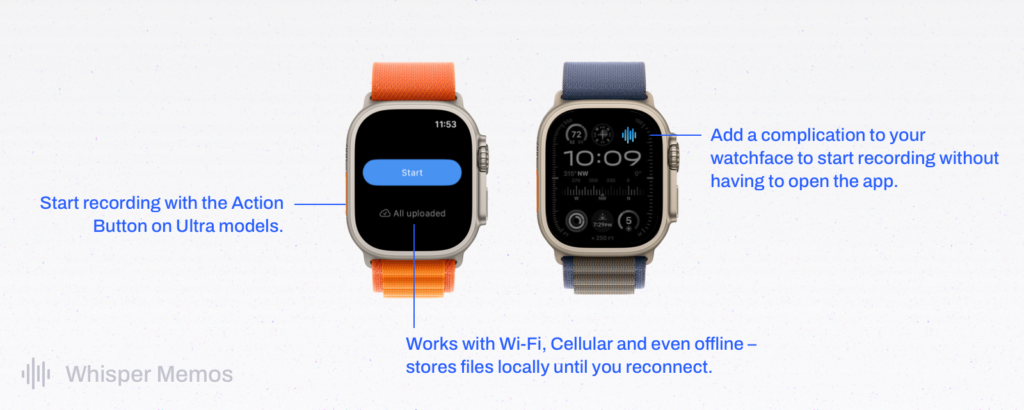
Behind the scenes, Whisper Memos is using OpenAI and GPT-4 to get the best possible transcription, and Google Firebase for authentication and data protection. You can opt out of storing your transcripts in your account, so Whisper Memos just sends them to your email and then dumps them, leaving no traces on their server
I’ve been using it (on Private Mode) for months now. It’s simple and incredibly useful. If you like to record your ideas and thoughts, I think you’ll love it, too.
Collaborating on Email with Spark Mail
I’ve made some changes lately to get help with my customer support work. As a result, I needed to find an email collaboration tool, and Spark Mail does the trick… This is a post for the Early Access and Backstage MacSparky Labs Members. Care to join? Or perhaps you need to sign in?
Mac Power Users 729: Don’t Hear What We Aren’t Saying
On this feedback episode of Mac Power Users, we’re talking more about AppleCare and the Vision Pro, then some listener feedback, and more proof Stephen and I spend too much time together.
This episode of Mac Power Users is sponsored by:
- Zocdoc: Find the right doctor, right now with Zocdoc. Sign up for free.
- Squarespace: Save 10% off your first purchase of a website or domain using code MPU.
- Ecamm: Powerful live streaming platform for Mac. Try it for free today.
- We Got Your Mac: Your guide to Mac adoption at scale. Listen now wherever you get your podcasts.
Automators 146: OmniFocus 4: Automation Update
In this episode of Automators, Rosemary and I talk about the new automation features that have come to OmniFocus 4.
The Lab Report for Friday January 26, 2024
It’s time for the latest Lab Report from MacSparky, covering this week’s Apple news and updates…This is a post for MacSparky Labs Members only. Care to join? Or perhaps do you need to sign in?
Day One Shared Journals
Day One just introduced a new, interesting feature: Shared Journals.

The idea is that you can share a journal. Multiple people could contribute. An individual’s entries are not editable by other participants, but it’s an excellent way to build a journal among friends and family.
This goes against the grain of journaling in that journaling is usually a very private thing. However, I see a use for this. I’ve already set one up with my wife, where we’re journaling our trips to Disneyland. It’s a way for us to create a record together, and it will be enjoyable. It has the added benefit that she is now regularly using Day One and is now doing more personal journaling that isn’t shared with me.
Overall, it’s a nice new feature, and if you’ve got loved ones also using Day One, I recommend giving it a try.
Testing PodHighlighter.io
People have been looking for a way to grab quick notes from a podcast for a long time. PodHighlighter.io is the best option I’ve seen to do this yet. It uses a Shortcut along with Overcast and some AI to get you notes and summaries from podcasts. In this video I show you how it works and how to set it up.… This is a post for MacSparky Labs Level 3 (Early Access) and Level 2 (Backstage) Members only. Care to join? Or perhaps do you need to sign in?
The Mac Turns 40
There are a lot of nice articles today about the Mac’s 40th Anniversary. My favorite was at the Steve Jobs Archive. The Mac was not a big “boil-the-ocean” project at Apple but something else, designed by a small team and largely left alone by the corporate types. The later “Think Different” ad campaign easily applies to the people who brought the Mac to life. I was a junior in high school when the Mac first arrived, and it was immediately obvious to me that computers would be “just like this” going forward.
If you’re interested in more of the story behind the development of the Mac, I recommend Andy Hertzfeld’s Folklore.org. It’s a gold mine of early Apple anecdotes. I’ll finish by saying that despite it’s age, my Mac remains the bit of Apple technology that I continue to use and rely upon the most.
What’s New in iOS 17.3
iOS 17.3 is out. Hooray. There are a few small new features and a big one, Stolen Device Protection. In this short video, I walk you through what’s new, what Stolen Device Protection is, and how to turn it on.…
This is a post for MacSparky Labs Members only. Care to join? Or perhaps do you need to sign in?